Your first webhook, end to end
Ten minutes, no code: take a URL from webhook.site, build the webhook as a sentence, send a test, then change a real record and read the delivery.
Updated September 2026
The fastest way to trust a webhook is to watch one arrive. This walk goes from nothing to a delivery you can read — with the Orders table of a plant shop's database standing in for yours. Ten minutes, no code.
Get a URL that catches requests
A webhook needs somewhere to send. Any of these works:
- webhook.site — open it and it hands you a unique URL that displays every request it receives. Perfect for a first run; nothing to build.
- Your automation tool — in n8n, a Webhook trigger node's URL; in Make, you don't need a URL at all, because Tabla is an app there and its Watch records trigger registers the webhook itself. The n8n and Make guides pick up from there.
- Your own endpoint — anything that answers a POST with a 2xx.
The URL must be reachable from the public internet. Tabla refuses local and
private-network addresses when you save — a webhook pointed at localhost
would be pointed at nothing from where Tabla stands.
Make one
- Open the database and switch to the Webhooks tab, next to Data.
- Click Add webhook.
- Name it something a colleague would understand — the demo database's is called "New orders → automation".
- Read the When sentence and set it: When a record is created in Orders. (Created is the default trigger; the table defaults to your first one.)
- Paste your receiver URL into Send to.
- Click Add webhook.
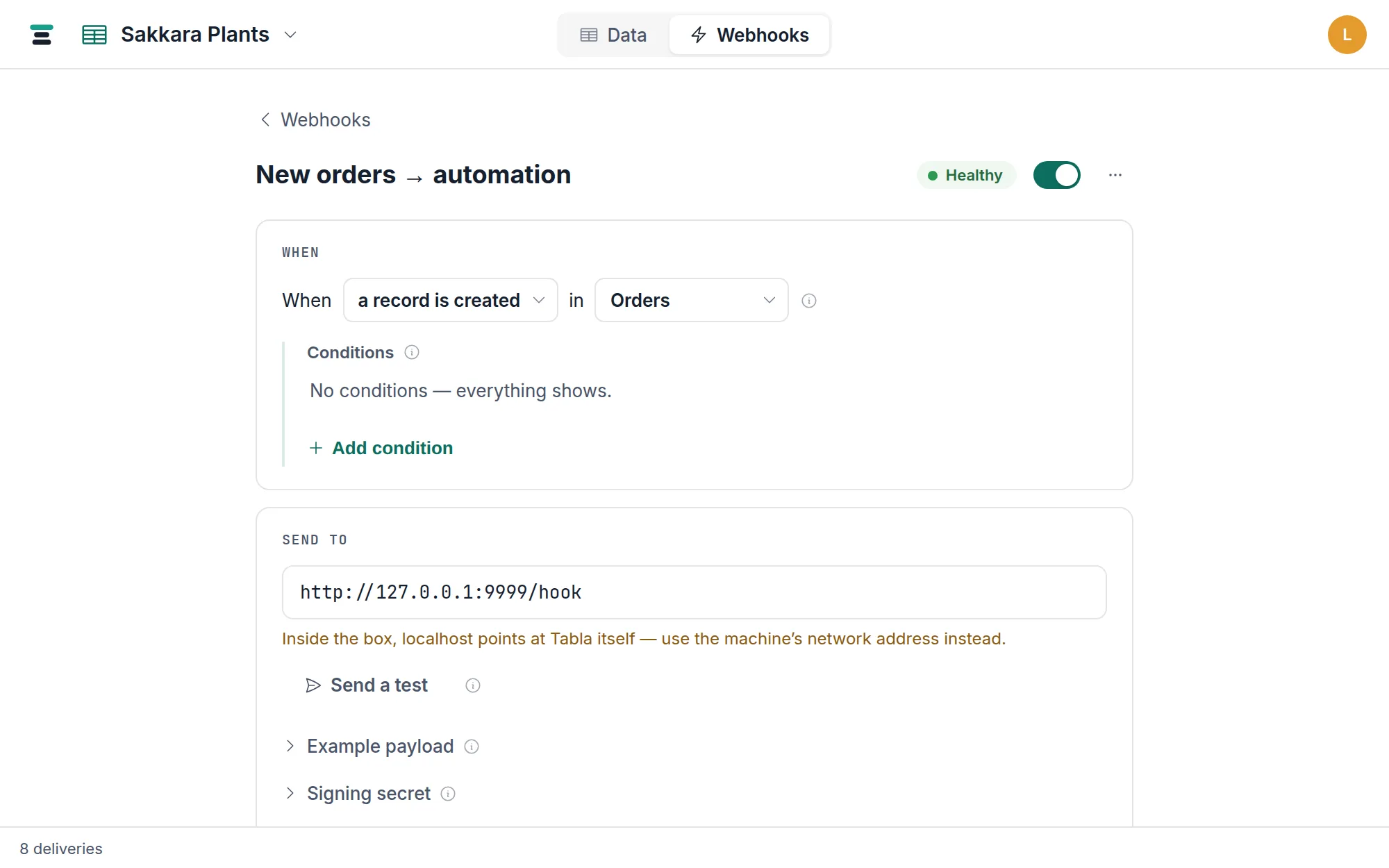
That's a live webhook. Everything below the sentence is there to prove it works.
Read the example payload first
Open the Example payload disclosure on the webhook's page. It shows the
exact JSON your receiver will get, built from the Orders table's real field
names — Status, Total, Customer — not placeholders. This is the shape to
program against, and the Cells keyed by toggle beside it decides whether
cells arrive keyed by field name (readable) or field id (rename-proof). The
payload reference takes it apart field by field.
Send a test
Click Send a test. Tabla sends one signed request to your URL right now,
with a sample payload flagged "test": true and the event name
webhook.test — sample values, real field names, real signature. The result
appears beside the button; on the demo webhook it reads Delivered — 200 in
3 ms.
A test is deliberately synthetic: it's sent once, never retried, and never counts toward the webhook's health. If it fails, the URL is wrong or your receiver isn't answering 2xx — fix that before touching real data.
Check your receiver: webhook.site shows the request body and headers,
including X-Tabla-Signature. You'll want that header later, when the
endpoint does something that matters —
verifying signatures is its own guide.
Change a record for real
Now the actual thing. Go back to Data, open Orders, and add a record — or create one over the API:
curl -X POST https://tabladb.com/api/tables/tbl_sf6ir2p5y3uc/records \
  -H "Authorization: Bearer key_xxxx.your-secret" \
  -H "Content-Type: application/json" \
  -d '{"records": [{"fields": {"Name": "ORD-1050", "Status": "New", "Total": 45}}]}'
The moment the record exists, the webhook fires. The delivery carries
"event": "record.created", the record's id, and the full record under
after — "Status": "New", "Total": 45 and every other field, exactly as
the grid shows them.
Read the delivery in the ledger
Back on the webhook's page, the Deliveries card now has a real row: a
green Delivered chip, the event name record.created, the record's name,
the HTTP status your receiver returned, and how long it took. Click the row
and it opens into the full exchange — Sent, the exact payload, and
Response, your receiver's answer — with a Replay button to send the
same payload again.
Every delivery this webhook ever attempts lands here, including failures and their retries. The delivery ledger explains the statuses, the retry schedule, and what happens to a webhook that keeps failing.
Where to go next
Narrow the trigger so it fires on the changes you mean — conditions and watched fields. Then point the URL at the tool that does the work: n8n or Make, step by step.