The delivery ledger: every send, readable
Every webhook delivery is logged: the payload sent, the response received, the four-attempt retry schedule, auto-pause after 20 failures, and Replay.
Updated September 2026
A webhook that fails silently teaches you to distrust automation. So every webhook's page ends in a ledger: one row per delivery, with the exact bytes sent, the exact response received, and what Tabla did about a failure. When someone asks "did the order hit the fulfillment system?", the answer is a row, not a guess.
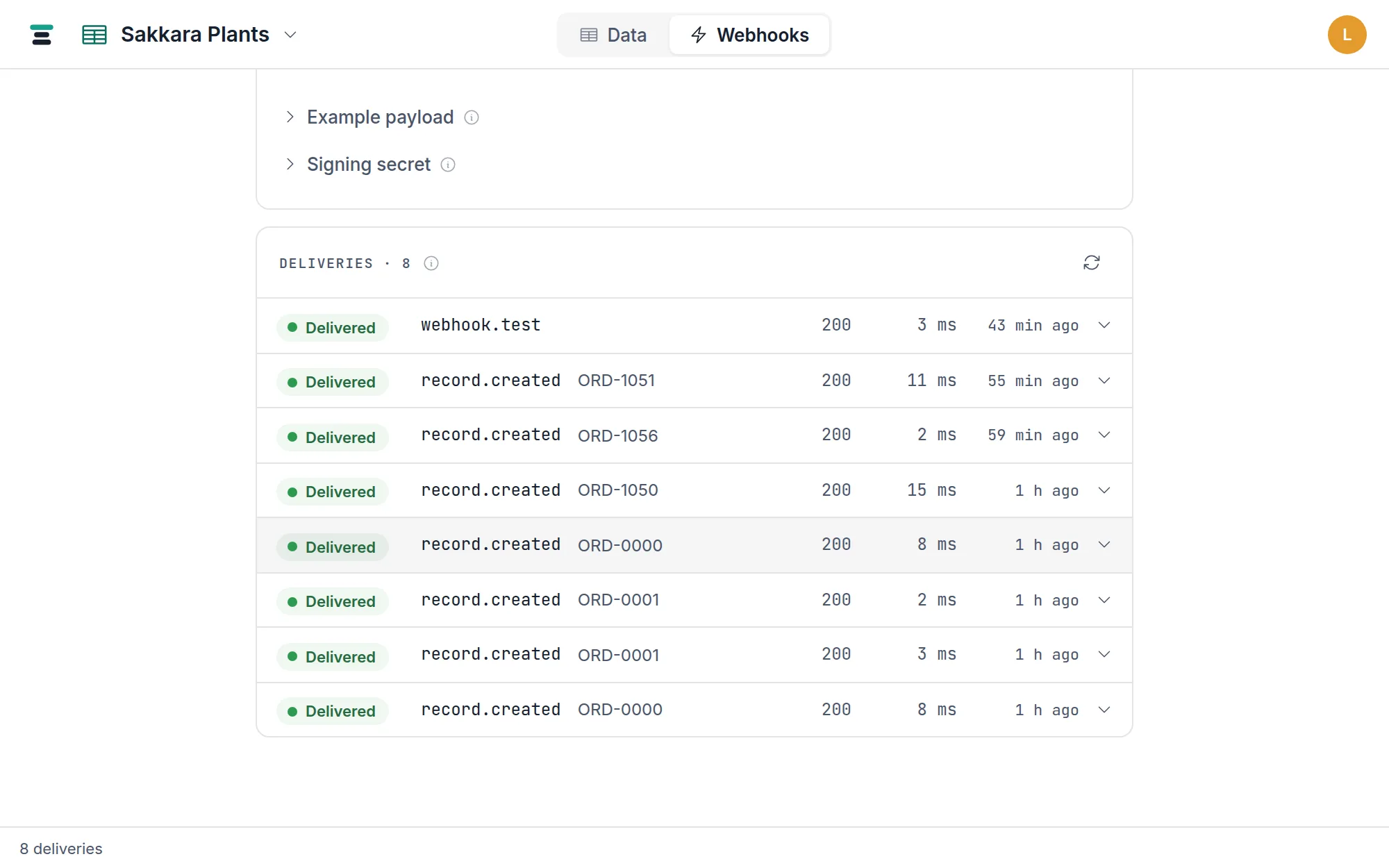
Reading a row
Left to right: the status chip, the event (record.created, webhook.test,
…), the record it was about — its display value, or the table name on a
whole-database webhook — the attempt count when there's been more than one
(try 2 of 4), the HTTP status your endpoint returned, the duration, and when.
A delivery has one of four statuses:
- Queued — waiting its turn, or scheduled for a retry.
- Sending — a request is in flight right now.
- Delivered — your endpoint answered 2xx. Final.
- Failed — four attempts exhausted. Final, and the row grows a Replay button.
"Delivered" means exactly: any 2xx response within the 10-second request timeout. Redirects are not followed — a 3xx counts as a failure, so point the webhook at the final URL.
Click any row and it expands into the whole exchange: the attempt line (when,
try N of 4, delivered time or next try in …), the error if there was one
(connect ECONNREFUSED, a timeout, an HTTP status), then Sent — the full
JSON payload, with a copy button — and Response, with your endpoint's
status, duration, and the start of its body.
The retry schedule
A failed attempt is retried after 10 seconds, then 1 minute, then 5 minutes — four attempts in all, a little over six minutes end to end. An attempt that succeeds anywhere along the way ends it: the delivery is Delivered and nothing more is sent.
Watched live against a dead endpoint: a delivery created at 23:03:12 retried
on schedule and reached Failed, try 4 of 4, at 23:09:50 with
connect ECONNREFUSED recorded on the row.
The schedule exists to ride out restarts and blips, not outages. For a longer outage, the ledger plus Replay is the recovery path.
The webhook's own health
Above the ledger — and on the Webhooks list — each webhook wears one of five chips:
- Not fired yet — created, no attempts.
- Healthy — the last delivery succeeded.
- Failing · N of 20 — N deliveries in a row have exhausted their retries. Any success resets the count to zero.
- Paused — see below.
- Off — the Active switch is off; a deliberate stop.
Auto-pause, and what Resume does
After 20 straight failed deliveries, the webhook pauses itself. Retrying into a dead endpoint forever helps nobody, and the pause is loud: a banner on the webhook's page — Paused after 20 straight failures. Nothing sends until resumed. — a Paused chip in the list, and a dot on the Webhooks tab itself, visible from the Data section.
Two things about a pause worth stating plainly:
- Events during a pause are dropped, not queued. A paused (or switched off) webhook enqueues nothing; resuming starts from now. If your endpoint was down for a day, replay what the ledger holds — the events themselves don't accumulate behind the pause.
- Resume is a clean slate. Clicking Resume clears the pause and resets the failure count to zero — you resumed because you believe the endpoint is fixed, so it isn't re-paused on the first hiccup.
Test sends never move any of this: a test is one attempt, never retried, never counted toward health.
Replay
Replay — on every failed row, and in every expanded row — queues a fresh
delivery of that delivery's exact payload. It gets a new delivery_id, a
fresh timestamp and signature, and the normal four-attempt retry schedule.
Replay is how you recover after fixing an endpoint: fix, then replay the
failures, newest last.
Replays (and tests) are editor-and-up actions — they cause real outbound traffic. Viewers can read the ledger but not send from it.
How long the ledger keeps
Deliveries are kept for 30 days, and a quiet webhook always keeps its most recent 200 regardless of age. The page shows the latest 50; the full stored set is readable over the API:
curl https://tabladb.com/api/webhooks/whk_wn6xcsbfk3by/deliveries \
  -H "Authorization: Bearer key_xxxx.your-secret"
Each entry carries the payload, status, attempt count, response status and body, duration, and error — the same facts the screen shows. For what's inside a payload, see webhook payloads; for making a failing endpoint verifiable, see verify signatures.