A database that reads right to left
Arabic in a table: direction detected per value, not per app, a chosen Arabic face, mixed Arabic-English rows. What RTL requires, and how Tabla does it.
Updated September 2026
Type a plant list in Arabic into most data tools and you can watch the tool lose interest. The names sit hard against the left edge of each cell, reading the wrong way across the column. A value ending in a question mark grows its punctuation on the wrong end. The font changes mid-table. None of it crashes. All of it says: this software assumed you'd never come.
Here's what right-to-left support actually consists of — most of it applies to any tool you might evaluate — and then how Tabla does it.
Why data tools usually get this wrong
Direction gets decided once, for the whole app. The interface is left-to-right, so every cell inherits left-to-right, and an Arabic value is laid out backwards-feeling and left-aligned — anchored to the edge the eye doesn't start from. The correct unit for direction in a database is not the app or even the column. It's the value. One column can hold an Arabic name in row 3 and an English one in row 4; each cell has to decide for itself.
Mixed content breaks at the seams. Real Arabic data is full of Latin
fragments — a SKU, a URL, a brand name — and Arabic text laid out in a
left-to-right cell puts the seams in the wrong places: the trailing period
renders at the far end, a parenthesis flips, PLT-104 splits an Arabic
sentence like a wedge. Ordinary bidirectional-text rules, applied in the
wrong base direction — the value needed to start right-to-left for its
internal seams to land correctly.
The font is a fallback. Interface fonts ship Latin glyphs. When Arabic arrives, the browser substitutes whatever the operating system has, so Arabic renders in a different face than everything around it — a different size and weight on each platform. Nobody chose that font. That's the tell.
Fast grids opt out of the browser. The quickest grids draw their own pixels on a canvas instead of using browser text layout — so the browser's bidirectional machinery never runs, and direction is right only if someone wrote that code. Mostly, nobody has.
What "native" actually means
Four commitments, checkable in any tool in ten minutes with one Arabic row:
- Per-value direction detection. The first strongly-directional letter of a value decides — the same first-strong rule browsers use. Arabic value, right-to-left and right-aligned; the English value below it, the opposite; same column, both correct.
- Editing follows. The box you type into runs right-to-left the moment your text does — cursor movement, selection, punctuation.
- A chosen Arabic face. An actual font, shipped by the tool, weighted to sit evenly beside the Latin one — not the OS default arriving by accident.
- Mixed tables as the normal case. Arabic product names, Latin scientific names, an email address, prices — one record. If the tool's Arabic support degrades when English appears in the next cell, it was a demo, not support.
What a mixed table looks like when it works
Here's an Arabic inventory table — plant names in Arabic, scientific names in Latin, prices in Egyptian pounds:
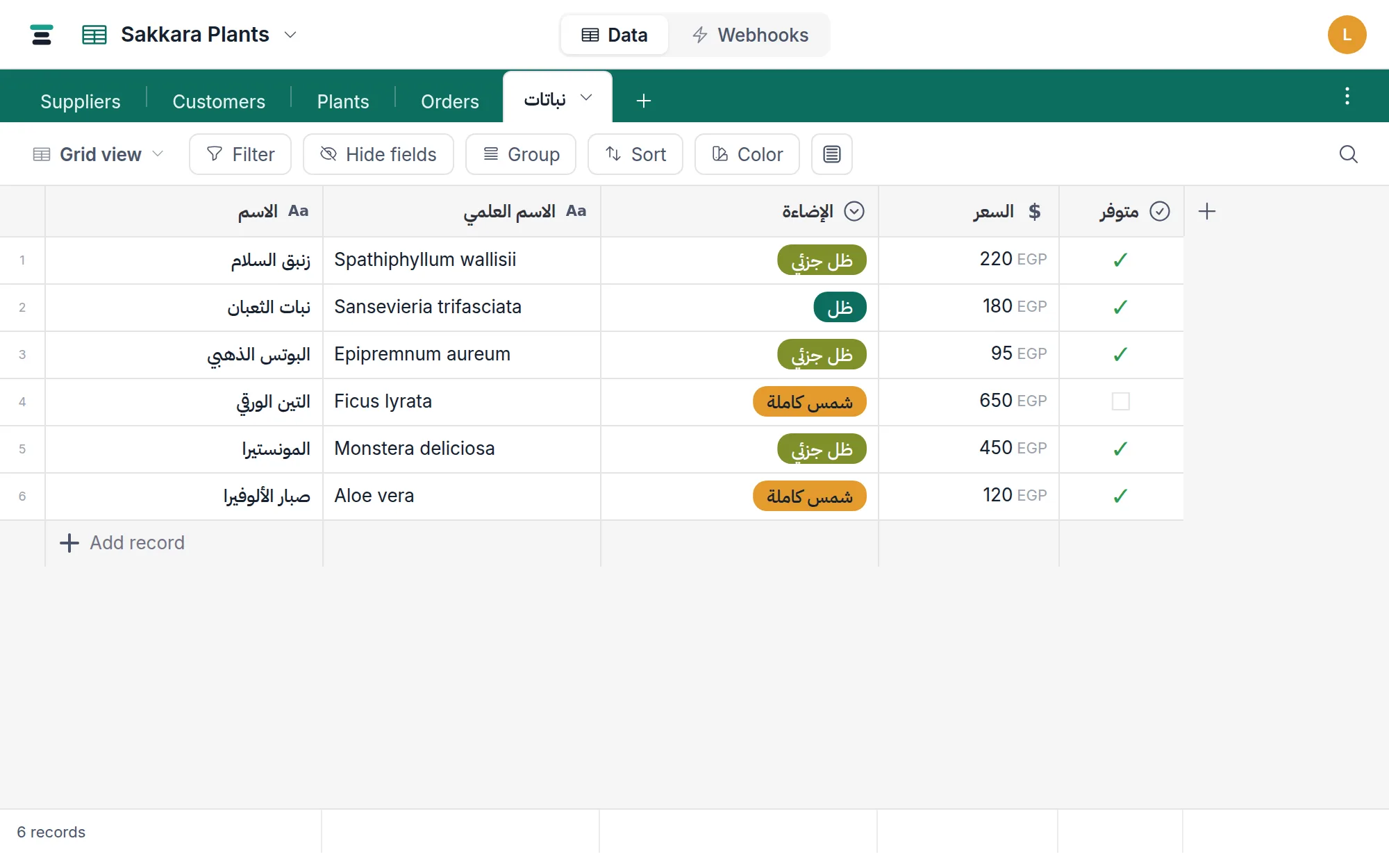
Each value reads its own way: زنبق السلام from the right,
Spathiphyllum wallisii from the left, in adjacent columns of the same row.
The choice chips — ظل جزئي, شمس كاملة — anchor to the right edge of
their cells. Nothing about this table was configured. The data decided.
How this works in Tabla
Every value carries its own direction. Wherever a value renders as browser text — the record panel, cards on the board and gallery, filter inputs, the link picker, public view links — the element is marked direction-auto, so the browser's first-strong detection runs per value. So is every box you type into, which is commitment 2 for free: the editor flips when your text does.
The canvas grid does its own detection. The grid draws its own pixels
for speed, so it can't lean on the browser — it applies the same
first-strong rule itself. Text cells detect a right-to-left value and
right-align it. Select and link chips go further: the row lays out from the
right edge, in right-to-left order, the canvas put explicitly into RTL
mode. Detection skips leading digits and symbols — Arabic-Indic digits
included, which are direction-weak — so ٣ أصص still reads right-to-left.
The Arabic face is chosen, not fallen back to. Tabla ships IBM Plex Sans Arabic, self-hosted, as the one Arabic face beside Inter for Latin — its normal weight mapped one step heavier, because at grid sizes Arabic otherwise reads thinner than the Latin around it. It leads every font stack in the product and declares the range of characters it answers for, so Arabic reaches it before anything else and Latin never does. Canvases don't trigger font loading on their own, so the grid loads the face explicitly and repaints — Arabic never gets stuck in a fallback font.
Arabic is data everywhere, not only in cells. Tables and fields can be
named in Arabic — the table in the screenshot is named نباتات and was
created over the API, Arabic field names and
all; the names are the JSON keys. Search matches
Arabic text like any other. Attachment filenames are stored verbatim,
Arabic included, and download under their own names.
This was a founding rule, not a retrofit: the design document Tabla was built from says any value that begins with Arabic text is displayed right-to-left and right-aligned in its cell, and scheduled verifying it inside the grid for the first week of building. The check ran: plain text cells passed as-is; chip cells turned out to have no direction logic at all, so Tabla draws its chips itself, with explicit direction — which is why commitment 1 holds on a canvas.
The honest limits
- The interface is in English today. Menus, buttons and settings are English and the layout is left-to-right — columns run left to right too. What's native is the data: your values, names, chips, searches. A mirrored Arabic interface is a different, later undertaking.
- Direction is detected, not assigned. First-strong is the whole rule.
A value that opens with a Latin code —
PLT-104 صبار— reads left-to-right, exactly as it would in a browser, and there's no per-cell override to force it. Digits-only values count as left-to-right.
Most tools in this category publish nothing about any of this, and ten
minutes with one Arabic row will show you why. Bring زنبق السلام and a
scientific name to whatever you're evaluating — including ours.