Import into an existing table: skip, map, or create each column
Import a CSV or Excel file into a table you already have: each column maps to a field, becomes a new one, or is skipped. Values are checked first.
Updated September 2026
The import wizard has two targets: a new table, or one you already have. This page is about the second — the monthly supplier price list, the signup sheet from an event — where the table, its fields, its views and its webhooks already exist and the file needs to fold itself in.
The promise is the same in both modes: values are checked against the types you approved before any of them is written. How much a failure undoes depends on the file — an Excel file is checked whole, a CSV is streamed in batches of 2,000 rows and keeps the batches that already landed.
Run one
- Open the ⋮ button at the right of the table tabs → Import data… → Upload a CSV or Excel file, and pick the file.
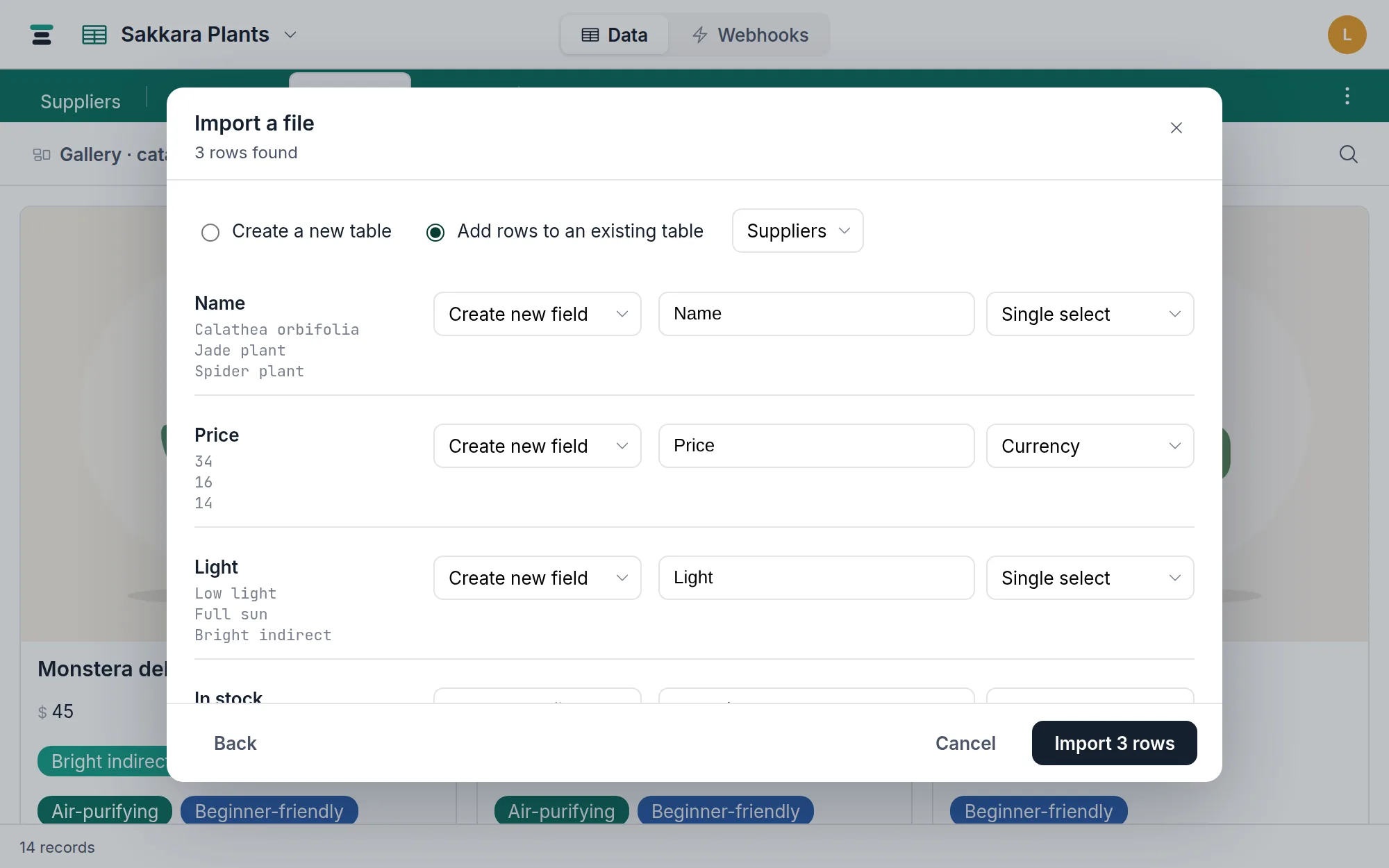
- Choose Add rows to an existing table and pick the table.
- Decide each column. Every column offers three moves:
- Map to existing field — the values go into a field the table already has.
- Create new field — the column becomes a new field on the table, named and typed by you.
- Skip — the column stays in the file.
- Click Import N rows.
What "map" offers, and refuses
The map list shows only fields that can take the column's values: text-like
columns map onto the text family (single line, long text, email, phone,
URL), number-like columns onto the number family (number, currency,
percent, rating), dates onto dates, checkboxes onto checkboxes, selects
onto selects. Duration fields take either — 1:30 from a text-ish column,
or a bare number. A column with no plausible target reads "No matching
field on this table."
What never appears: links, attachments, buttons, and computed fields (formula, lookup, rollup). A CSV cell has no record ids to resolve and computed fields have no writable column — the server refuses those targets too, with "can't be an import target — it's computed, not a plain field."
How values squeeze into existing types
Each cell is coerced to the target field's type, strictly:
- Number: thousands separators stripped —
1,287lands as 1287. - Currency: symbols stripped; a cell with no digit at all ("TBD") is refused rather than becoming zero.
- Percent: the trailing
%stripped —15%lands as 15. - Checkbox:
true/1/yesandfalse/0/no, any case. - Date: ISO dates as-is;
03/04/2026obeys the per-column Read dates as control (month-first or day-first). - Duration:
1:30, or a bare number read in the field's own format. - Multi select: the cell splits on comma-space or semicolon-space —
Pet-safe, Air-purifyingis two choices, not one.
An empty cell writes an empty value. Nothing is guessed silently: the type doing the coercing is the one you picked on screen.
Selects grow to fit
Mapping onto a select field whose choices don't cover the file would strand rows, so missing choices are added automatically — existing choices keep their ids and colors untouched, and new ones are appended. (Airtable's importer does the same.) The ceiling is 100 distinct choices; past it the import refuses and names the count: "…has 132 distinct choices — too many for a select field. Map it to a text field instead."
When a row is bad
The values are checked before the write, so the failure is a clean sentence naming the spot:
Row 3: "many" isn't a number, needed for field "Qty".
For an Excel file, and for a CSV inside its first 2,000 rows, nothing lands at all: fix the cell in the file and run it again, and the table is exactly as it was. A longer CSV goes up in batches, so the batches already accepted stay and the error counts them: "…N row(s) were already added before this failure and remain in the table." The row number it names counts from the start of the batch that failed, not from the top of your file.
Two honest edges. First, the import appends only: it cannot recognize that row 12 of the file is an update to an existing record. Updating by id is what the records API is for. Second, a dropped connection mid-write ends the run the same way a bad value does, and leaves the same disclosure behind — so a re-run after either one appends to whatever already landed.
The questions people ask
Will my webhooks fire for every imported row? Mostly no. Imports write in bulk, and bulk writes of 50 records or more fire no webhooks — though a small import, or a big one's final short batch, is under that line and does. If a webhook must not see the import at all, pause it first.
Can I import twice without duplicates? Only by not importing the same rows twice. There's no key matching — every row in the file becomes a new record.
How big can the file be? A CSV or TSV has no limit — the browser reads it and streams the rows, so the only ceiling is your database's own 1,000,000 records. An Excel workbook is 20 MB and 50,000 rows per run, same as every import.