One timezone per database: what it changes and what it never touches
One timezone per database: what it changes for display, filters, the calendar and formulas, and why stored values, API payloads and exports stay UTC.
Updated October 2026
A date-and-time value in Tabla is stored as one exact instant, in UTC. The database's timezone decides how that instant is read: which clock it displays as, which calendar day it belongs to, and what "today" means in a filter — and how a date you write is understood. One timezone per database — not per person — so a team in Cairo, Berlin and Toronto reads one consistent clock instead of three private ones.
New databases start on UTC.
Set it
- Click the database name in the top bar.
- Under Time zone, pick from the list — the standard IANA names,
Africa/Cairo,Europe/Berlin, about 400 of them.
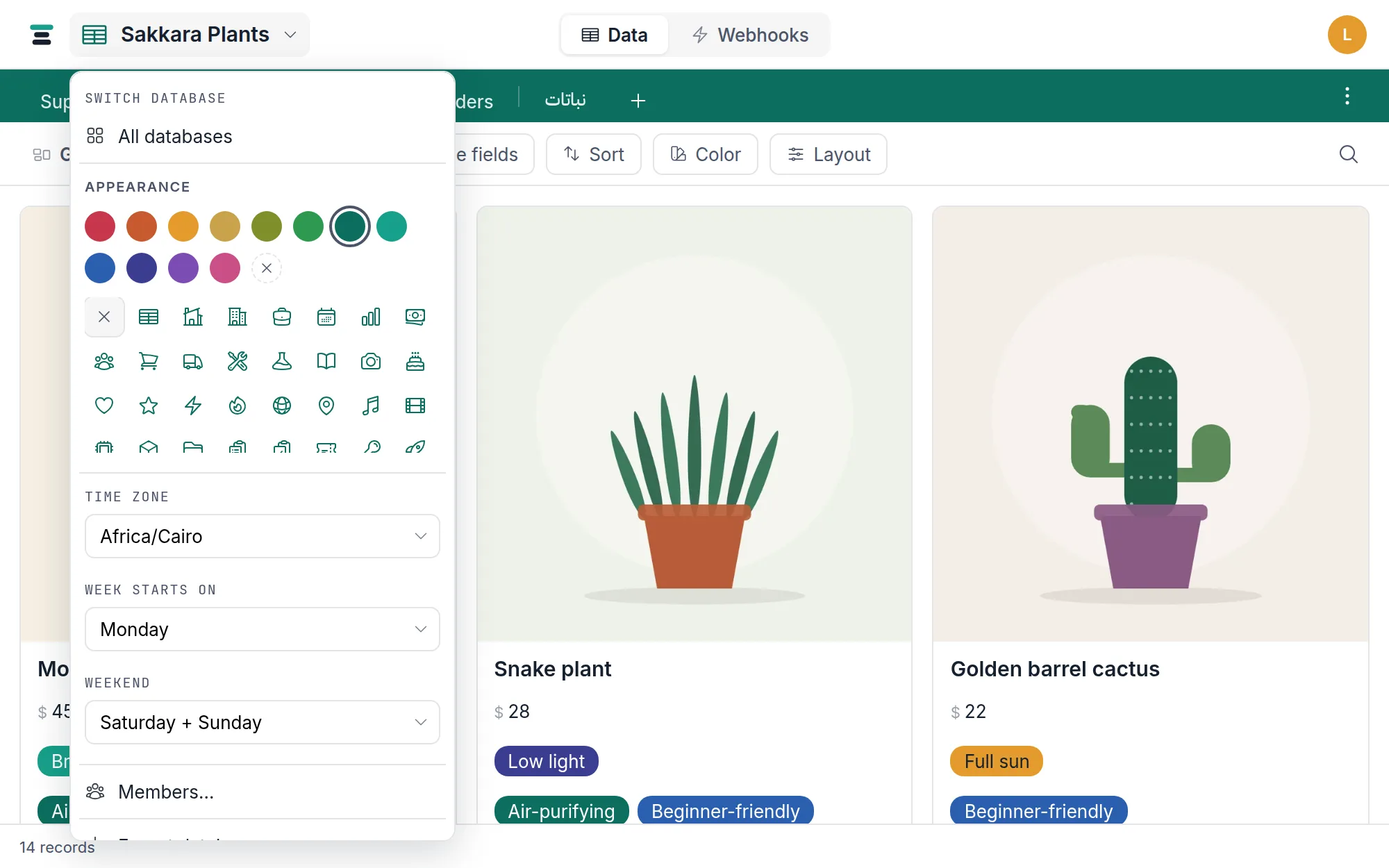
The change applies immediately, for every member. Editors and owners can
change it. Two sibling settings sit under it in the same menu — Week
starts on and Weekend (with presets including Friday + Saturday) —
which the calendar follows. Weekend does one more
job, described in full in the formula guide: it is the
week WORKDAY and WORKDAY_DIFF count on, so changing it recomputes every
formula that uses them — and, like the timezone, it says how many before it
does and what it rewrote afterwards. Week starts on is a display choice: it
changes no formula, so it asks nothing.
What it affects
Each of these is the same rule wearing different clothes: day boundaries are drawn in the database's timezone.
- Display. A date field with time shows and edits as the wall clock in the database's timezone, in the grid and the record panel both. The stored instant never moves; the clock face does.
- Filters. Filtering a date-and-time field by a bare date — "Placed is 2026-08-05" — means that entire day in the database's timezone, midnight to midnight. The relative values (today, and its offsets) resolve to the calendar day the database's clock currently shows.
- The calendar. Records bucket onto the day they fall on in the database's timezone; the "today" highlight and the day the calendar opens on follow the same clock, so the highlight and your filters can never disagree about what day it is.
- Webhook conditions. A condition on a date-and-time field draws its day boundaries in the database's timezone, exactly like the grid filter — a trigger and a filter with the same terms agree about which day a record falls on.
- Writes. A date written through the API,
a form or an import is understood on this clock too: a bare
2026-08-12on a date-and-time field is the start of 12 August here, a time with no zone (2026-08-12T10:00) is 10:00 here, and a timestamp carrying a zone written to a date-only field lands on the day it falls on here. - Switching Include time. Turning a date field's time on gives each date midnight in this timezone; turning it off keeps the day each value falls on in this timezone.
What it never touches
- The stored value. Changing the timezone moves no date. The same instants, shown on a different clock — which near midnight can mean a different calendar day on screen. (Formula columns that bake the timezone in are recomputed, which is what the confirmation counts.)
- Date-only fields. A date without a time —
2026-08-13— has no timezone once it is stored. It displays, filters and exports verbatim, the same in every zone. - The API and webhook payloads. Over the API, and in every
webhook delivery, a date-and-time value is the UTC instant, ISO 8601
ending in
Z. The timezone is presentation; the wire format doesn't bend. - Exports. The CSVs in a database export carry the same UTC instants, so an export re-imports exactly. A spreadsheet opened elsewhere may therefore show a different clock time than Tabla does — the zip's own README says so in as many words.
The honest edges
Daylight saving is handled, with two narrow exceptions. The zones carry their own DST rules, so displayed clocks shift when the zone shifts — nothing to configure. The first exception: typing a wall-clock time that falls inside a DST transition's skipped or repeated hour lands on one side of the fold, and there is no way to say which you meant. It's one hour, twice a year, in zones that observe DST at all.
The second: switching a date field's Include time on gives each date midnight, but a few zones move their clocks forward at midnight — Cairo does, on the last Friday of April — so that one day has no midnight. A date on it gets the first hour the day has, 1:00 AM, and stays on its own day.
Formulas use this timezone too. A formula that
reads a date-and-time field works from the same calendar day the grid, the
filters and the calendar view show — they agree. Until September 2026 formulas
were the one surface still working in universal time, so a value late in the
evening local time counted as the next day inside a formula and not anywhere
else; that is fixed. Change this setting and any formula that depends on it is
recomputed to match, which the confirmation tells you before it happens. A
formula can also ask what today is: TODAY() reads this same clock, and NOW()
is the moment itself — wherever a formula needs the day of it, that is the day
on this calendar, so a formula, a filter and the calendar never disagree about
which day it is. And because such a formula is worked out on every read rather
than stored, there is no overnight job to miss.
The questions people ask
Can each member see their own timezone? No. One database, one clock, on purpose — "the meeting is on the 14th" should mean the same row to everyone who can see it.
I changed the timezone and some records show a different day now. That's the feature working. The instants didn't move; the day boundary did. Records within a few hours of midnight are the ones that cross it.
Which timezone should a distributed team pick? The one your operations live in — where deliveries happen, where the workday is anchored. Ties go to wherever the person who reads the calendar most is sitting.