Linked records: connect two tables
A link field holds records, not text. Creating one creates its mirror on the other table, and a column of typed names becomes links in one pass.
Updated September 2026
A link field's cell doesn't hold text — it holds other records. In the demo shop, an order links to the customer who placed it and to the plants inside it; the customer's record, in turn, lists every order. That second part is the point: a link in Tabla is two-way, one relationship readable from both ends.
Links are also what lookup and rollup fields ride on, which is why this field tends to come first. If you're new to the idea itself, relationships, explained starts further back.
Make one
- Add a field and choose Linked records.
- Links to — pick the other table. Links stay within one database.
- Allow many — off links one record per cell (an order has one customer); on links many (an order holds many plants).
- Mirror name — the field that appears on the other table. Left blank, it takes this table's name: a Customer link on Orders puts an Orders field on Customers. The demo's Plants link names its mirror "Ordered in".
Creating the field creates both sides at once. The mirror always allows many — even if fifty orders each link one customer, that customer's mirror holds fifty orders.
Two more settings exist for the picker, both editable later: a filter ("Only records that match can be picked for this link") and Fields shown when picking — up to four fields on the picker's cards, or three plus a photo. The wiring itself — which table, one-or-many — is fixed at creation; to change it, delete the field and add a new link.
From a column you already have
Often the relationship is already written down as text: a spreadsheet arrives and the customer's name sits in an ordinary Customer name column on Orders. That column is a link waiting to happen — Tabla builds one from the values themselves, matched against the records in the other table, in a single pass.
Do this first, on the other table. A value can only match whatever names a record, and what names a record is that table's display field. So Customers' display field has to be the field holding those names, and it has to be plain text. Set it where the records live, not where the column is: on Customers, click the arrow on that field's header and choose Use as display field. It's the easiest step to miss, and everything below rests on it.
Then, on the column itself:
- Click the arrow on the column's header and choose Link to another table… — or open Edit field… and pick Linked records, which lands in the same place.
- Match against — the table whose records these values name.
- Link field name — what the new field is called. Left blank, it's the column's name and the word "link".
- Allow many — off, the whole cell is one value. On, a comma or semicolon followed by a space cuts a cell into several and each one gets its own link: "Monstera deliciosa, Golden pothos" is two values,
1,234is one.
Then Create link field.
Nothing is converted. A new link field appears beside the column, and the column itself is left exactly as it was — the values you matched from are still sitting there. Afterwards Tabla offers Delete Customer name next to Keep it: removing the original is its own step, taken once you've seen the result.
Before it runs, the pane counts the work against your real data:
- how many records hold a value — those are the ones that get a link;
- how many values already name a record in the other table;
- how many name nothing yet, because a record is created there for each one;
- how many name more than one record, where the first is the one linked.
Matching ignores capitals and spaces around the value: fiddle-leaf FIG, with or without a stray space at either end, finds Fiddle-leaf fig. Records in this table's trash are linked too, so one restored later comes back with its link already made. A single run creates up to 20,000 new records; for more than that, import the records first and link the column after.
The mirror follows the usual rule, which is worth a glance before you start: the field that appears on the other table takes this table's name — a link built on Orders puts an Orders field on Customers. If Customers already has a field by that name, the run stops and says so; rename that field first.
With the link in place, a lookup brings the rest across: point one through the new link at the customer's Email, and every order shows the address — still owned by the customer record, still right when it changes.
In the grid
Linked records draw as outlined pills, distinct from a select's filled chips: an outline means a record that opens. The first click selects the cell; on the selected cell,
- a chip opens that record in a panel over the grid — edits land in its own table;
- the ✕ on a chip unlinks it;
- the + at the cell's edge, the +N overflow counter, Enter, or a double-click open the picker. On a phone, open the record and use the link field there — the picker fills the screen.
A grid can also be grouped by a link column — bookings by property, tasks by client — which is usually the fastest way to read a table that hangs off another one. A cell holding several links files its record under the whole set, as one group.
A link cell also takes a paste. The pasted text is matched against the linked table's display field by the same rule as above — capitals and spaces around the value ignored, the first record when two share a name — and a value that names nothing creates a record there. On a link that allows many, a comma or semicolon followed by a space separates one cell into several values; on a single link the whole cell is one value. It works on one cell or a whole column at once, and the rest of the paste rules are in pasting into the grid.
The picker
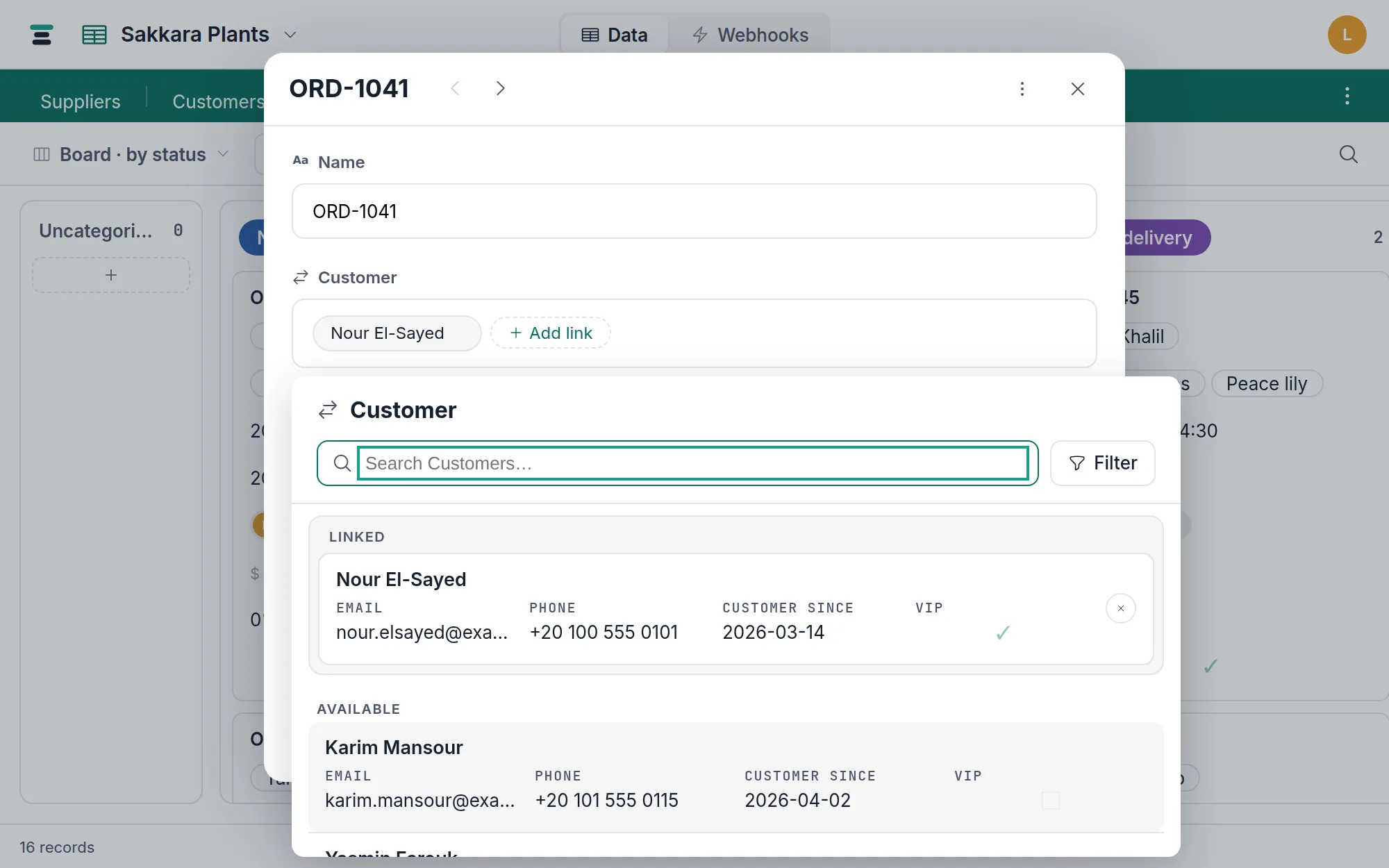
The picker is two shelves. Linked shows everything already in the cell — all of it, regardless of what you search, so nothing linked can hide. Available lists the rest of the target table as cards: the display field as the title, your chosen card fields under it, the first attachment field as a thumbnail.
- Search runs on the server against the whole linked table, not only the loaded page — and against more of each record than its name. It matches the target's text fields, its select values by the label you read, the people its member fields name (by name as well as email), and the names of the records it links to, one step across. Not numbers, dates or attachments; searching explains why.
- Records the term names come first. A card that came up for some other reason says so underneath — "Matched in Status" — so a result you weren't expecting reads as explained rather than random.
- Filter builds real conditions on the linked table's fields, the same grammar as view filters, on top of any filter baked into the field.
- On a single link, picking replaces the value and closes. On a multiple link, picking adds and the picker stays open.
- Type a name that matches nothing and the picker offers Add record "Fiddle-leaf fig" to Plants — it creates the record with that name and links it in one motion. The offer only appears when the target's display field is plain writable text.
The steal, disclosed
A single link means at most one, ever. So if you're on a customer's Orders mirror and you pick an order that already belongs to another customer, that order moves — it can't be in two places when its own side links one. The picker never does this silently: such a card says, in wine, "Linked to Nour El-Sayed — picking moves it here". The same rule holds over the API. Assigning from the order's own side is the same operation seen from the other end: setting ORD-1041's customer to Karim removes it from Nour.
When a linked record is deleted
Trash a record and it vanishes from every link cell that pointed at it, immediately. Restore it from the trash within 7 days and it returns — links intact, because trashing never touched the connections. Once the trash empties, the record and its connections are gone for good; the cell holds one fewer record. Deleting a linked record never deletes the records linked to it.
Deleting the link field removes both sides and every connection between the two tables — and is refused, by name, while a lookup or rollup still rides it.
Deleting the table on the other end reads the same way, at column scale: the link column goes blank for the seven days that table sits in the trash, then fills back in with the same records if it's restored, because nothing between the two tables was cut. If the seven days run out, the link field goes too — both sides of it.
Over the API
A link cell reads as a list of {id, display} pairs — the display value comes from the target's display field, so a client never needs a second call to label a chip:
"Customer": [{ "id": "rec_gs8683t5vvcn", "display": "Nour El-Sayed" }],
"Plants": [
  { "id": "rec_y4crk8w9hc3e", "display": "Monstera deliciosa" },
  { "id": "rec_fxnmkz5wjyme", "display": "Golden pothos" }
]
Even a single link reads as a list, so the shape never changes. Writes take a list of rec_… ids (or the objects a read returned, unchanged). Two ids into a single link are refused plainly:
{ "error": { "code": "bad_request",
  "message": "Field \"Customer\" links a single record; got 2." } }
Writing either side updates both, and both records' updated_at move. The rest of the write rules are in /docs/api.