The date field, with or without time
Switch a date field's time on or off whenever you like, and what happens to the values already there. Formats, the database timezone, the API shapes.
Updated October 2026
A date field holds either a calendar date — 2026-08-13, the same day
everywhere on earth — or an exact moment, 2026-07-28T10:24:00.000Z. The
demo plant shop's Orders table has one of each: Placed records the
moment an order came in; Deliver by is a promise about a day.
The Include time switch decides which, and you can flip it whenever you like.
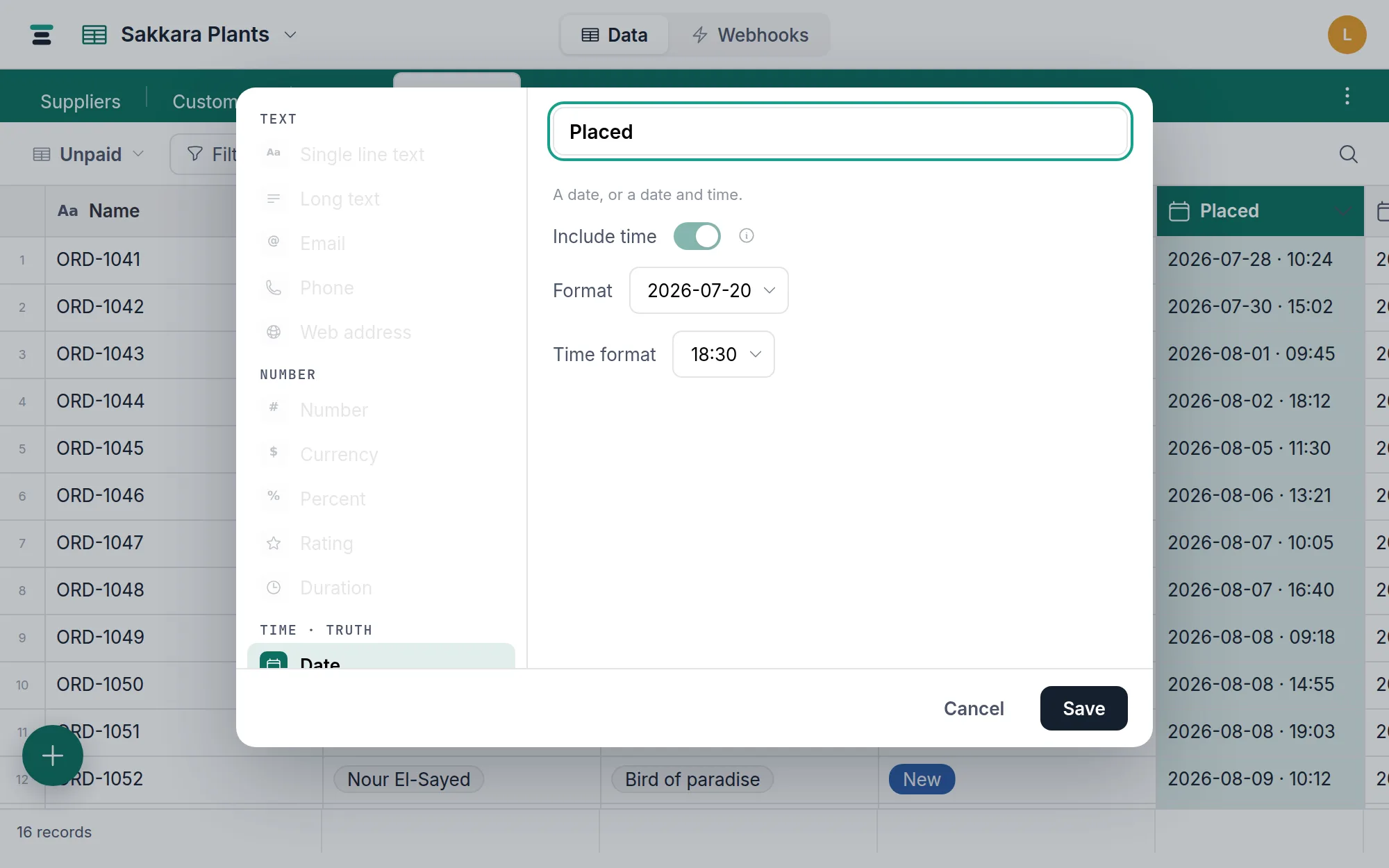
Switching Include time on or off
Open the field's settings and flip Include time. The values already in the field are converted, and before you save, the dialog says what will happen to them:
- Turning it on gives every date a time of midnight (12:00 AM) on the same day, in your database's timezone — or the first hour that day has, on the rare day the clocks skip midnight.
- Turning it off keeps the day each value shows and removes its time of day. The dialog counts the records that have a time before you save.
Formulas that use the field are recalculated, and
lookups and rollups that show it follow along. Two
things stop the switch, by name, before anything changes: turning time off
while a formula reads the time itself — HOUR(), say — and a field set to
require unique values where two records
would land on the same day.
From then on, the API and webhooks hand over the new shape: an
exact instant with time on, a plain YYYY-MM-DD with it off. A Make or n8n
scenario that matches records on this field wants updating at the same time.
The display options
- Format — five ways to draw the day:
2026-07-20·07/20/2026·20/07/2026·Jul 20, 2026·July 20, 2026. New fields made in the editor start onJul 20, 2026; fields created over the API with no format read as2026-07-20. - Time format (with time on) —
18:30or6:30 pm.
Both are display only, changeable any time, and fixed rather than per-viewer: everyone reads the same column the same way.
Editing
The cell opens a calendar — pick a day, or hit Today or Clear. With
time on there's a time box beside it that accepts nearly anything a person
types: 13:47, 1:47 pm, 9. Pasted values work too; a pasted time with
no timezone on it is read in the database's timezone.
"Today" is the database's today
A with-time value is one instant, but which day that instant belongs to depends on a timezone — and Tabla resolves it with the database timezone, a per-database setting. The grid displays with-time values in it, and a filter on "today" flips at its midnight, the same moment for every member wherever they sit. One shared clock, no per-viewer surprises. Set it once for where the work happens — details at Database timezone.
Date-only values ignore all of this: a promise about 2026-08-13 needs no
clock.
Filter operators: is, is not, before, after, on or before, on or after, the empty pair — with relative values like today available where you'd type a date. Is not counts a record with no date as not being on that day, so is and is not between them cover every record. Date fields also power the calendar view.
Over the API
The two kinds read differently:
{ "fields": { "Placed": "2026-07-28T10:24:00.000Z", "Deliver by": "2026-07-31" } }
With-time values are ISO timestamps in universal time — convert for display
yourself. Date-only values are bare YYYY-MM-DD strings.
Writes take "2026-07-31" for date-only, and a timestamp with at least
hours and minutes for with-time — include an offset (Z, +02:00) to be
unambiguous. Free-text dates ("July 2", "07/02/2026") are refused rather
than guessed at: a silently misread date is worse than a rejected one.
When it's the wrong field
A length of time (1:30) is a duration, not a
date. A "done" flag with no meaningful day is a
checkbox. And if the date should follow from other
fields, a formula can compute one.