Formula fields: computed from the record itself
Arithmetic, text joining, date math, IF and SWITCH, computed by the database itself so nothing drifts. The builder, the text mode, the function list.
Updated October 2026
A formula field computes its value from the record's other fields. The demo shop's Orders table has one called To collect:
{Total} * (1 - {Discount} / 100)
Every order shows the discounted amount, nobody types it, and it is correct the instant either input changes — because the value isn't synced by the app, it's computed by the database itself. The column is a real Postgres generated column, maintained on every write. A stored total that drifts out of date is not a failure mode this field has.
The builder and the text mode
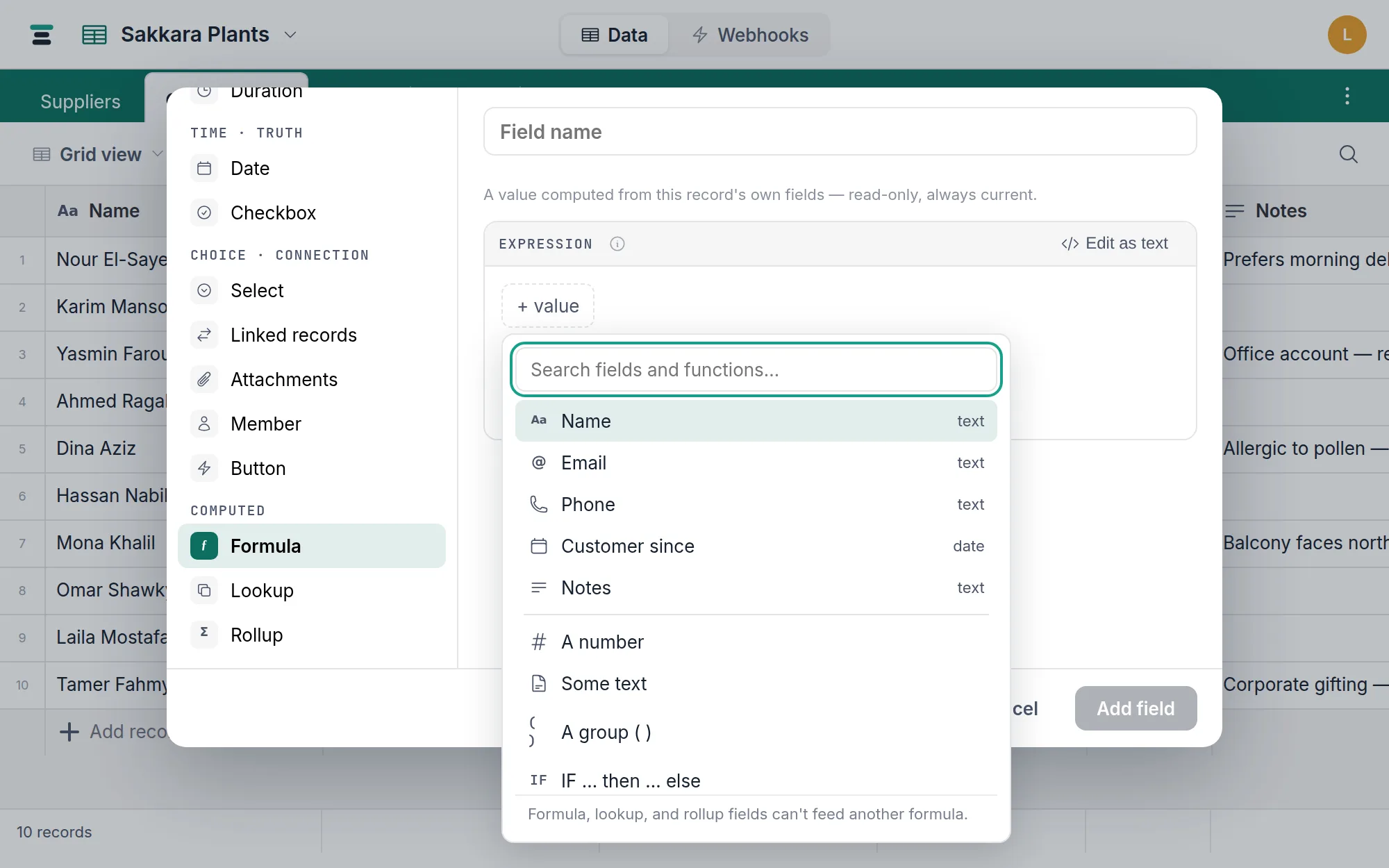
Add a field and choose Formula. A new one opens on a shelf of finished examples built from this table's own fields — days between two dates, a number with tax added, two text fields joined — so the first formula you see is one about your own table. Pick one to load it as pills, or start from scratch for the empty editor and its field list. Either way you land in the same editor, which has two skins that hand off to each other losslessly:
- The builder — the default. You compose the expression as pills: fields, functions, operators, values. A "Reads as" line shows the grammar being written while you build, and turns into plain English once the formula is complete — the days from Check-in to Check-out, if Paid is ticked, "paid"; otherwise "unpaid". A ladder of
IFs reads as the table you would have drawn on paper, one line per rung, rather than one long sentence. Beneath it the editor works the formula through your table's first record, step by step, so you see a real answer before the field exists. - Edit as text — a plain expression box for typing and pasting. Reference fields as
{Field Name}; a one-word name works bare. Completion opens on any word you type — fields insert in their braces, functions with their parenthesis — and mistakes are marked at the exact spot, with the nearest real names offered as one-click repairs.
Either way the type of the result — number, text, date, date and time, or yes/no — is inferred from the expression and shown live. There is no type to pick, so none to get wrong.
Shown as
Under the expression is one line, Shown as, and for most fields it reads Plain and is never touched again. It is where the result puts its clothes on.
A number result can be drawn as a currency (with your own symbol, before or after), a percent, or a duration in h:mm — alongside the decimal places and thousands separators every number formula already had. A date result picks its date format there, and a date and time result its time format beside it.
A text result can be drawn as select chips: the same coloured pills a single select uses, on a value your formula worked out.
IF({Nights} > 7, "Long stay", IF({Nights} > 2, "Short stay", "One night"))
Switch that formula to chips and the three values are already in the list, in the order the formula produces them. You colour them and drag them; you never type them. That order is the order the field sorts and groups in — which is the whole reason chips beat coloured text, because Small, Medium, Large sorted alphabetically reads Large, Medium, Small and helps nobody.
Three things worth knowing:
- A value the list doesn't name still shows, as a plain grey chip carrying its own text, and sorts after the ones that are named. Nothing you compute can disappear because nobody picked a colour for it.
- Filtering offers the list. "Stay is …" gives you the values to pick from rather than a box to spell them into. "Contains" keeps its box, because a substring is a substring.
- It changes nothing about the value. The column, the stored text and what the API returns are identical with chips and without. Colouring or reordering the list is a settings change and touches no records at all — so it's instant on a table of any size.
If your formula doesn't work out to a fixed set of values — it joins text together, or one branch returns a field — there's nothing to read off it, and the editor says so and leaves the list to you. The chips still work; only the pre-filling can't.
A ladder of IFs, as a table
A formula that picks between several outcomes gets written as IFs inside IFs, which is the least readable shape a formula has. When yours is one, the editor offers Edit as rules and shows it as what you would have drawn on paper:
when  Nights  is more than  7  →  long stay     12
when  Nights  is more than  2  →  short stay    31
otherwise                      →  one night      4
Each row is one field, one comparison, one value, one result, and the number beside it is how many of your records actually come out that way — counted through the whole ladder, so a later rule never claims the records an earlier one already took. Add and remove rows, and Edit as a formula goes back to the pills with everything carried across.
It only offers itself when it can show the formula honestly. A condition using AND, an expression on either side, or a computed result needs more than four dropdowns to say, so the table stays out of the way and the builder handles it.
Before you save it
While you build, a line under the editor says what the formula would do to every record in the table: how many get a value, how many come out empty, and how many different values it produces. That last number is the one to read. The commonest way a formula goes wrong is a comparison that never matches — testing a status against "yes" when the choice is spelled Yes — and the result looks perfectly reasonable in the grid while being identical in every row. 1 different value across twelve thousand records says so at a glance.
Open it and you get the spread of values and real rows from your own table, the empty ones included — which is usually where the mistake is. Nothing is created to work this out: no column, no field, and no lock on the table. It also reads the records in your bin, because those are the ones saving the field will look at.
What the language covers
Deliberately small, and checked before anything is saved:
Arithmetic —
+ - * /, parentheses, and&to join anything into text.Comparisons and logic —
IF(condition, then, else)with= != > >= < <=, combined withAND,OR,NOT; nesting is fine, andSWITCH(value, case, result, …, default)reads better than a ladder of IFs.BLANK()tests an empty cell. Theelseis optional.IF({Video}, "ready")leaves the cell empty when there's no video, which is what you want when you're building a label out of several conditions and most of them won't apply. A field on its own is a condition too, and asks whether it is filled in:IF({Video Link}, "here", "not yet")says whatIF({Video Link} != "", …)says, and reads the way you would say it out loud. A number counts zero as empty alongside blank —IF({Discount}, …)means there is a discount — and where that distinction matters,= 0and= BLANK()still tell the two apart.Yes/no — a checkbox can feed a formula, and a formula can return one:
{Nights} > 3orAND({Paid}, NOT({Refunded}))makes a field that shows as a checkbox and filters like one. A checkbox standing on its own as a condition asks whether it is ticked, and an empty one counts as no.TRUE,FALSE,XOR,REGEX_MATCH,IS_AFTER,IS_BEFOREandIS_SAMEall answer yes/no.Text —
UPPER,LOWER,PROPER,TRIM,LEN,LEFT,RIGHT,MID,REPLACE,REPT,SPLIT,SUBSTITUTE,FIND,SEARCH(likeFIND, ignoring capitals),T,CONCATENATE,TEXTJOIN.TEXTJOIN(", ", …)skips the empties, so a blank never leaves a stray separator behind — which is what makes it the tool for a list of the things that apply:TEXTJOIN(", ", IF({YouTube}, "YouTube"), IF({Facebook}, "Facebook"), IF({TikTok}, "TikTok"))One line per candidate, no false results to write, and an episode on two of them reads YouTube, Facebook.
FINDandSEARCHtake an optional third number — where to start looking — soFIND("-", {Ref}, 5)skips the first four characters.Text you type yourself — anything in double quotes.
\nstarts a new line,\ta tab, and\"puts a quote inside the text:CONCATENATE({Street}, "\n", {City})writes an address over two lines. A real line break typed inside the quotes works too and means the same thing.Multi-select — a multi-select cell holds several choices, so it comes into a formula as a list.
ARRAYJOIN({Tags}, ", ")writes it out;ARRAYUNIQUEdrops repeats, keeping the first of each;ARRAYCOMPACTdrops the empty entries;ARRAYSLICE({Tags}, 1, 2)takes a part of it;ARRAYLENGTH({Tags})counts them. A formula has to end in something a cell can hold, so join the list before you finish — and a list can't be compared directly with=, because that would quietly mean "the same choices in the same order".Patterns —
REGEX_EXTRACTandREGEX_REPLACE, for pulling a reference out of a note or stripping what shouldn't be there. Patterns are the database's own flavour, which has no back-references or look-ahead.Numbers —
ABS,SIGN,ROUND,ROUNDUP,ROUNDDOWN,INT,CEILING,FLOOR,EVEN,ODD,MOD,POWER,SQRT,EXP,LN,LOG,PI,VALUE,MIN,MAX,SUM,AVERAGE,COUNT,COUNTA,COUNTALL, and trigonometry (SIN,COS,TAN,ASIN,ACOS,ATAN,ATAN2,DEGREES,RADIANS).CEILINGandFLOORtake an optional step, soCEILING({Price}, 25)rounds up to the next 25.Dates —
TODAY,TONOW,FROMNOW,YEAR,MONTH,DAY,WEEKDAY,WEEKNUM(both take an optional"Sunday"or"Monday"to say where a week starts; Sunday if you don't),DATESTR,DATEADDandDATETIME_DIFF(units: minutes, hours, days, weeks, months, years), plus plain date math:{Check-out} - {Check-in}is a number of days,{Placed} + 3a date.Times, to the minute —
NOW()is this moment, to the second, and a date-and-time field keeps its time inside a formula.DATETIME_DIFF({Check-in}, NOW(), "minutes")counts the minutes until check-in,DATEADD({Check-in}, -2, "hours")is two hours before it, andIF(NOW() >= {Publish at}, "due", "scheduled")changes at that exact moment. Two dates with times compare to the second; a date with a time beside a plain date compares days, soNOW() > {Due}means today is past the due date. Counting in days or longer counts calendar days — check-in Monday afternoon to check-out Thursday morning is 3 — while minutes and hours count the time in between. Joined into text, a time reads like2026-07-21 14:45on this database's clock;DATETIME_FORMATwrites any other shape.Working days —
WORKDAY({Ordered}, 5)is the date five working days later;WORKDAY_DIFF({Start}, {End})counts the working days between two dates, both ends included. Both use this database's weekend, set beside its timezone — Friday and Saturday, Saturday and Sunday, one day, or none. Change the weekend and every formula that uses it is recomputed. Neither takes a list of public holidays.Writing a date out —
DATETIME_FORMAT({Check-in}, "DD/MM/YYYY")writes a date in the shape you want, fromYYYY YY MM M DD D HH H mm m ss s; anything in[square brackets]prints as itself. Month and day names aren't among the pieces — a name has a language, and Tabla doesn't have a language setting yet.Time of day —
HOUR,MINUTE,SECOND,TIMESTRandSET_TIMEZONEread the time of a date and time: a date-and-time field,NOW(), or a time worked out with hours or minutes. A plain date carries no time to read, and they say so rather than answering midnight.The record —
RECORD_ID,CREATED_TIMEandLAST_MODIFIED_TIME(when the record was created and last changed, to the second).
A long formula can be written as named steps, one per line, the result last:
nights = DATETIME_DIFF({Check-out}, {Check-in}, "days")
subtotal = nights * {Rate per night}
subtotal + subtotal * 0.14
Coming from Airtable? Most formulas paste straight across: 78 of the 84 functions listed in Airtable's own formula field reference are here, under the same names, and the optional arguments they take are the same ones. Six of theirs are deliberately absent — ARRAYFLATTEN (nothing here makes a nested list), ERROR and ISERROR (a Tabla formula can't produce an error cell), and DATETIME_PARSE, SET_LOCALE and month/day names in DATETIME_FORMAT, which all wait on a language setting.
A formula can read the record's text, number, date, yes/no, single-select and multi-select fields (a select reads as its choice's name, and a deleted choice as nothing at all). It can read a linked-record field: it comes through as the names of the records it points at, joined with , — the same string the cell shows — so IF({YouTube}, "on YouTube", "") asks whether anything is linked. Like a lookup, that makes the formula live: worked out fresh on every read, shown but not searched, filtered or sorted on. A link into a table whose records have no name is refused by name rather than guessed at. It can read an attachment field for two things only: whether anything is attached — IF({Photos}, "has one", "none") — and how many, with ARRAYLENGTH({Photos}). Not the file names. Those live in a different table, and a formula is a real database column that can only see its own row; anything else is refused by name rather than quietly writing an internal id into the cell. It can read another formula — doing so makes this one live, worked out fresh on every read rather than stored, because a stored formula is a real database column and one column can't be built from another. It can read a lookup or a rollup too — their values live in another table, so a formula that reads one is worked out fresh on every read and can be shown but not searched, filtered or sorted on (filter on the lookup itself instead). A chained lookup works too — one that reads through another lookup, so a value two tables away reaches the formula. A lookup across a link that allows many records holds several values: as text they join with , — the same string the cell shows — and as numbers or dates they're refused, because a joined string isn't a number. One kind still can't feed a formula at all: a lookup carrying its own "only linked records that match" filter. Both rules apply anywhere in the chain. Nor can a button, which carries no value of its own, nor a multi-person people field, whose entries name members rather than choices — a single-person one reads as text like any other. Both IF branches must produce the same type.
Editing after creation
The expression is editable after creation: open the field, change it, save. The result type re-infers from the new expression — a number formula edited into an IF that returns text becomes a text formula. Changing only how it's shown — its format, its name — never changes its type. Any formula that reads this one is recalculated to follow the edit; if one can't (it does arithmetic on what is now text, say), the edit is refused with that formula named. The other refusal: if a lookup or rollup on another table depends on this field's current type, the type-changing edit is blocked by name until that dependent is adjusted.
Writing it out. The text box indents as you go: Enter keeps the line you're on, and gains a level after an opening bracket. Tab indents, Shift+Tab takes a level back, and both work on a whole block if you select one. Typing ( or " adds the closing half, typing the closing half yourself steps over it, and backspace between an empty pair removes both. A ) typed at the start of a line jumps back to the column of the bracket it closes, and steps onto the closing half already waiting there rather than leaving you a second one — none of it inside quotes, where those are characters of your text rather than brackets. Cmd+Enter (Ctrl+Enter) saves, Cmd+Z undoes. While the suggestions are showing, Tab and Enter take the highlighted one instead. Ctrl+M switches Tab back to moving between controls, so the box never traps you if you work by keyboard — it says so on screen while that is on, and Ctrl+M again returns it to indenting. A formula you have laid out across lines opens as text next time, exactly as you left it — the visual builder draws a chain on one line and would flatten it.
What a formula field can't do is convert into an ordinary field or back — the column is a generated expression, not typed-in data. To keep computed values as plain data, add a plain field and paste the column in.
Honest edges
- Division by zero,
SQRTof a negative,LNorLOGof zero, andVALUEof text that isn't a number all produce a blank, never an error cell. So does any result too large for the database to hold — aPOWERorEXPthat runs away goes blank rather than stopping the record from saving. - Wherever a formula asks for a day —
YEAR,WEEKDAY, a difference in days — a date and time gives the day it falls on in the database's own timezone, the same calendar the grid and the filters use, so a day a formula derives matches what you see. Change the database timezone and every formula that depends on it,TODAY()andNOW()included, is recomputed to match. TODAY()andNOW()make a formula a live formula: worked out fresh on every read rather than stored, because a database-maintained column can't depend on the current moment. That is what makes it always right — there is no saved value to go stale and no overnight job to fail, so a filter on one is exact at the moment it is asked, over the API as much as on screen — and an open view showing or filtering on one re-reads itself as each minute turns. A webhook whose conditions use one is checked every 30 seconds, so it fires within about half a minute of the moment, whether or not anybody has the table open. You can filter and sort on a live formula exactly like any other field, and creating one is instant on a table of any size, because there is no column to build. Two things it gives up, and the editor says so before you save: it can't be found by search, and a lookup or rollup on another table can't point at it.- A formula that doesn't check out — a typo, a type mismatch — is refused at creation with the exact place named. It never half-exists.
Everywhere else, an ordinary field
A formula field filters, sorts, groups and feeds webhook payloads exactly like a plain field of its result type, and reads over the API under its own name:
"Total": 63,
"Discount": 10,
"To collect": 56.7
Writing to it is refused: "To collect" is a formula — it's computed automatically and can't be written to directly. The cell is read-only on screen for the same reason.
When you actually want a different field
A formula sees one record at a time. The moment the calculation crosses a link — the customer's total across orders, the latest delivery date across lines — you want a rollup, or a lookup for a single borrowed value. Formula, lookup or rollup sorts the three in two minutes.