Field types: every kind of column, on one page
The twenty field types, grouped the way the field editor groups them, one line each — and why swapping between types that share storage is free.
Updated October 2026
Every column in a table is a field, and every field has a type. The type is really two decisions wearing one name: what the column stores (text, a number, a date, a true/false, a set of choices) and how it shows and edits (a currency symbol, stars, a checkbox, chips). Storage decides what the API returns and how filters compare and sorts order. Presentation decides what your eyes and your cursor meet in the grid.
That split matters once, and pays off forever: types that share the same storage can be swapped without touching your data. More on that at the end.
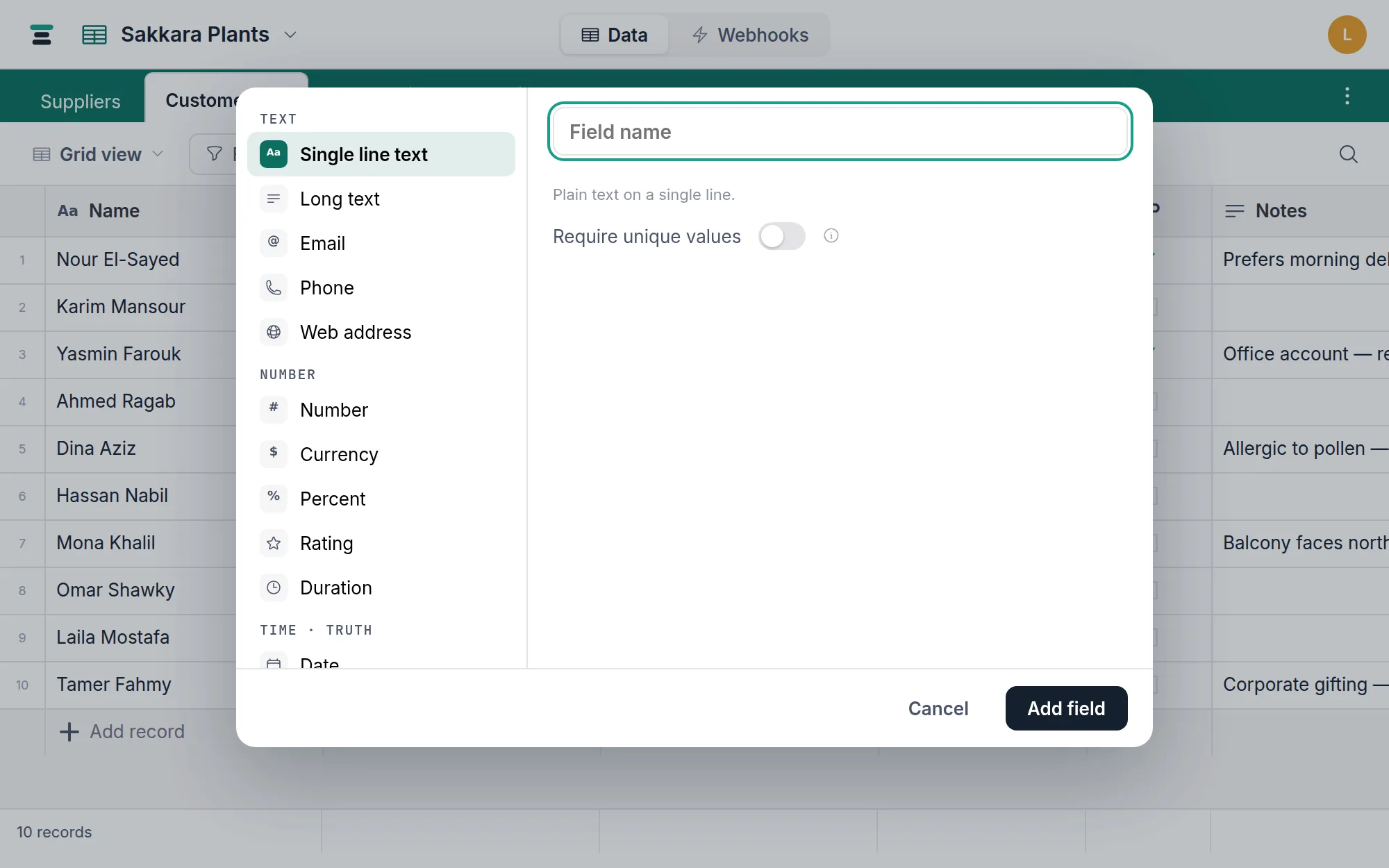
To add a field, click the + at the right end of the grid header (or any column header → Insert right), pick a type, and set its options. Each type's own page covers the details.
Text
- Single line text — plain text on one line. Names, codes, titles. Can require unique values.
- Long text — paragraphs, with an optional rich-formatting mode (bold, italic, lists, links).
- Email, phone, and web address — text that knows what it is, shown as a mail, call, or web link.
Numbers
Five types, one number underneath — the difference is what the number means and how it reads.
- Number — a plain numeric value, with decimals and thousands-separator options.
- Currency — a number wearing a symbol you choose, before or after the figure.
- Percent — type
50, read 50%. No hidden division. - Rating — whole numbers drawn as stars (or hearts, flags, bolts), clickable in the cell.
- Duration — reads
1:30, stores seconds, so sums and averages come out right.
Time and truth
- Date — a calendar date, or a date and time. Switch the time on or off whenever you like; the values already there are converted, and the dialog says how first.
- Checkbox — on or off, with a pickable icon and colors.
Choices and connections
- Select — named choices with colors. One per cell, or many with the Allow multiple toggle. Renaming a choice keeps every record.
- Linked records — a two-way link to records in another table. A mirror field appears on the other side.
- Attachments — files on the record, up to 100 MB each.
- Member — a person from the database's member list. One, or several with its own allow-multiple toggle.
- Button — a clickable action on every row: open a templated link, or send a webhook. It stores nothing.
Computed
These derive their value instead of storing one, and are read-only in every cell.
- Formula — computed from the record's own
fields, like
{Total} * (1 - {Discount} / 100). - Lookup — shows a field from linked records.
- Rollup — sums, counts, or averages a field across linked records.
Not sure whether you want a formula, a lookup, or a rollup? One page settles it.
Changing your mind is often free
Because a type is storage plus presentation, changing between types that share storage rewrites nothing. Number, currency, percent, rating, and duration are all one numeric column — switch a Number to Currency and the figures stand still while the symbol appears. The text family (single line, long text, email, phone, web address) converts freely the same way. A single select can become a multi select; each cell's choice survives as a list of one.
Some changes cross storage and need a real conversion. Those run, and the dialog counts the cost against your actual data before they do — text to number clears the values that aren't numbers and tells you how many; text to select mints the choices from the values themselves. It's all-or-nothing: never a half-converted column. Attachments, buttons and the computed three are built from wiring rather than values, so their type is set when the field is created and never changes. A link is wiring too — but a text or number column still has a road to one: Link to another table… on the column's header menu builds a new link field beside it and fills it by matching each value against a record in the table you pick (linked records).
The full map of what converts, what's checked, and what's refused is at Change a field type.
Two limits worth knowing
A table holds up to 500 fields, and the first ordinary field you create becomes the table's display field — the value that stands for the record in link chips and search. Everything else about a field — name, options, position — you can change whenever you like.