Hiding fields: fewer columns, same data
Hide fields per view: the data stays, the record panel still shows them, the API still returns them, and a public view link shares only the visible ones.
Updated September 2026
A table accumulates fields faster than any one screen needs them. Hide fields is the per-view answer: each view chooses which columns it shows and in what order, and the field itself — with all its data — is untouched. A packing view showing four columns and an accounting view showing twelve can sit on the same sixteen-field table.
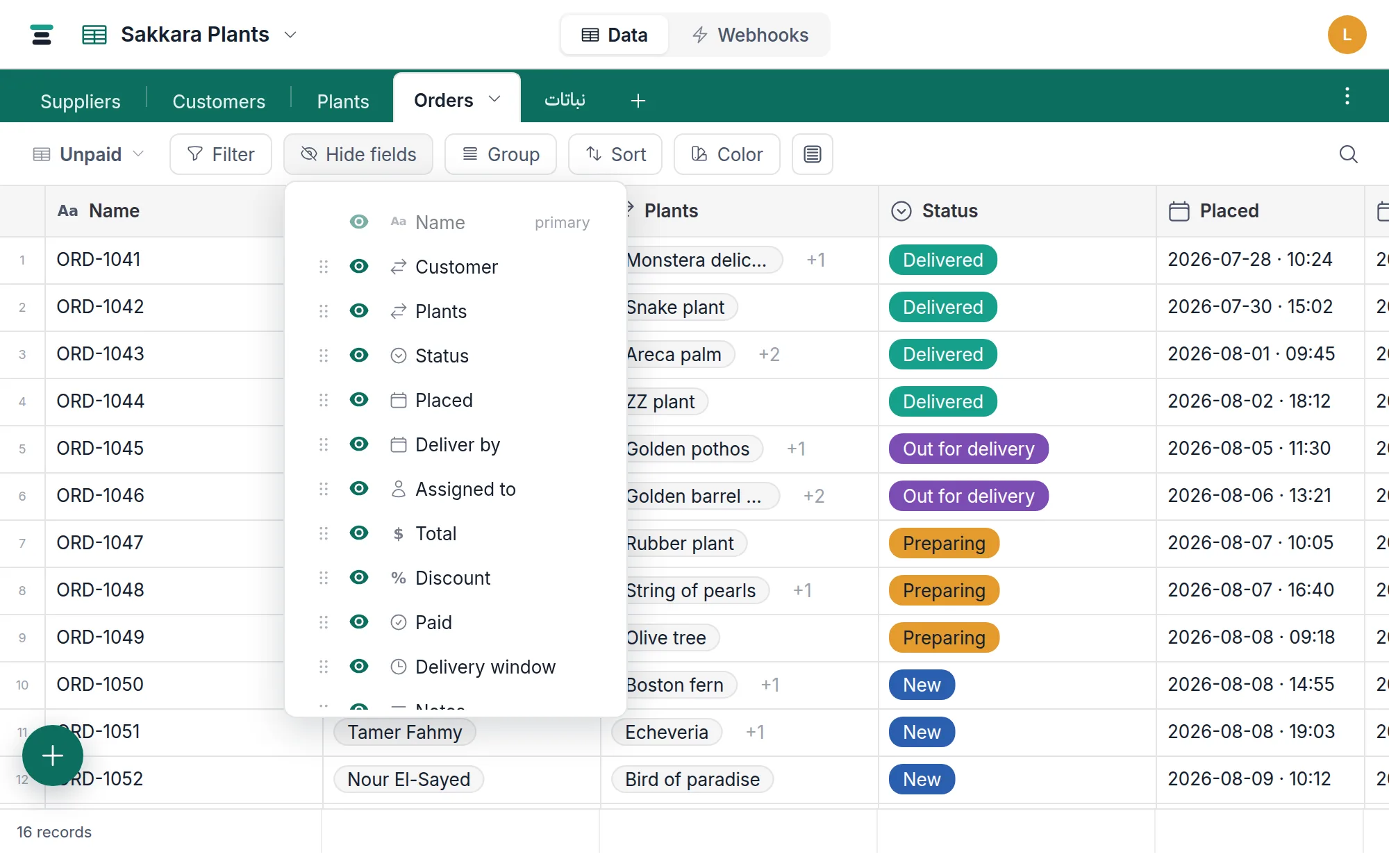
Show, hide, reorder
- Open Hide fields in the view bar. The button counts what's hidden — Hide fields · 3.
- Every field is listed, in the view's column order. Click a field's eye to toggle it: a filled eye is visible, a slashed one hidden.
- Drag the grip at a row's start to reorder — the grid's columns follow, because this list is the column order. (Dragging column headers in the grid edits the same order.)
Or skip the list: a grid column's header menu — the chevron beside its name — has Hide field too. It makes the same per-view change in one click, and the footer offers Show for a few seconds afterwards, in case that was the wrong column.
Both visibility and order are the view's own. Hide a column in Everything and Unpaid doesn't blink.
The display field is the exception
The first row — marked primary — has no working eye and no grip, and its column's header menu leaves Hide field out for the same reason. The display field titles the record: it's what a link chip shows, what a card is called, what the record panel puts at the top. A view without it would be rows with no names, so it can't be hidden and stays the first column, frozen at the grid's left.
Hidden is not gone
Worth being precise about, because "hide" can sound like more than it is:
- The data stays. Hiding changes what a view draws, nothing else.
- The record panel still shows every field. Open any record and the hidden ones are right there, editable.
- The API still returns them. Hiding is not access control — an API key reads the table, not a view. For actually keeping a field from someone, per-field permissions are on the wishlist, stated plainly.
- Filters and sorts on hidden fields keep working. A view can filter by
Paidwithout showing the Paid column.
The one place hiding does travel: a public view link shares the view's visible fields only, in the view's order — an anonymous visitor never sees a hidden column. That's the honest use of hiding as tidiness versus sharing: inside the database it's tidiness; on a share link it decides what leaves.
What else the list drives
Because the visible set is the view's vocabulary, the other layouts read it too:
- Gallery and board cards build their body from the visible fields (minus title and cover), so this list is how you decide what a card says.
- Calendar entries take their context lines from it.
- Footer summaries stand under visible columns.
A new gallery or board even starts with most fields hidden — three body fields, the rest waiting in this list — because a card that shows everything reads as nothing.
The questions people ask
Hide or delete? The column's header menu offers both — hide near the top, delete alone at the bottom, which is the distance between them on purpose. Hide when the field belongs to the table but not to this screen. Delete when the field shouldn't exist at all — that removes its data everywhere, in every view, and asks first. If you're hesitating, hide; hiding is free to undo.
Do other people see what I hid? Yes. Views are shared, so hiding a column in a view hides it for everyone using that view. There's no per-person hiding — make another view instead; views are cheap.
Does a new field show up everywhere? It appears in every view, at the end of the columns. Views that shouldn't show it hide it from this same list.