Saved views: one table, many ways of looking at it
One table, many saved views. What a view remembers — filter, sort, hidden fields, row height, color rules — and how to make, rename, switch and delete one.
Updated September 2026
A view is a way of looking at a table, saved under a name. The records are the same underneath — a view stores no data of its own — but each view keeps its own answer to "which records, in what order, showing which columns." An Unpaid view filtered to open orders and an Everything view can sit on the same table, and switching between them is one click in the view bar.
Every table has at least one view. A table that has none yet gets one made for it the first time it opens, named Grid view — which is also the one view a table can never lose.
What a view remembers
Five things, headline-size:
- Filter — which records show (filtering).
- Sort — what order they come in (sorting).
- Hidden fields — which columns appear, and in what order (hiding fields).
- Row height — one of four steps, in the grid.
- Color rules — condition → color (color rules).
And the quieter rest: column widths, footer summaries, grouping, and each layout's own settings — a board's stacking field, a calendar's date range, a gallery's card size. All of it lives in the view, so two views can disagree about every one of these things and both be right.
What a view never holds is data. Editing a record in one view edits it in all of them, because there is only one record.
Make one
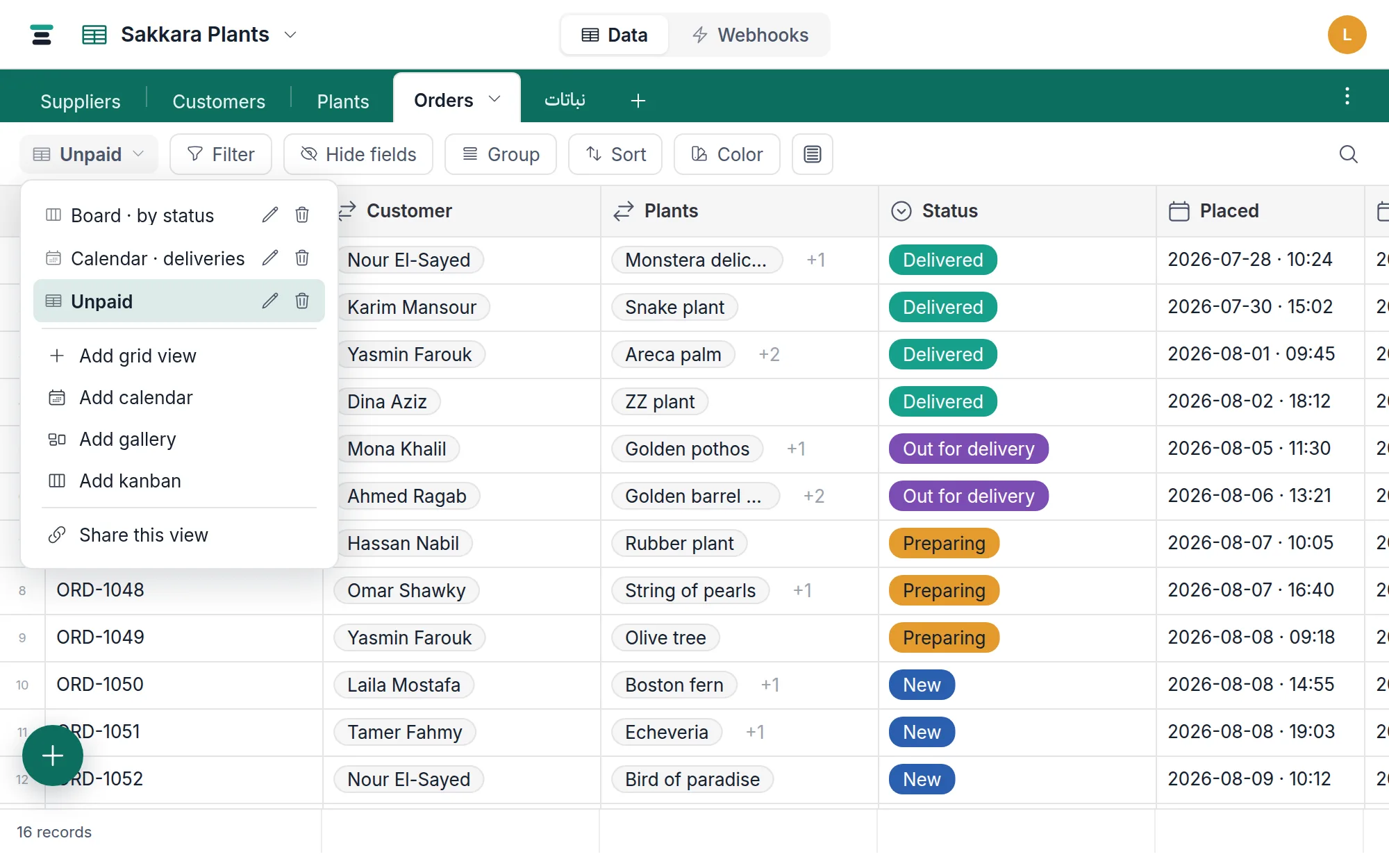
- Open the view switcher at the left of the view bar — the button showing the current view's name.
- Below the list of existing views, pick a layout: Add grid view, Add calendar, Add gallery, or Add kanban (the board).
- The view is created, named after its kind —
View 2,Calendar,Gallery,Kanban— and opens at once. Rename it to what it's for.
A view's layout is chosen at creation and stays. To see the same table as a calendar and a grid, make one view of each — that's the intended shape, not a workaround.
Switch, rename, delete
Switching is the view switcher again: click a view and you're in it. The
URL picks up ?view= so a reload, a bookmark or a pasted link opens the same
view, and each table remembers the view you last had open.
Renaming is the pencil icon beside a view's name in the switcher. Type, press Enter.
Deleting is the trash icon in the same row. The confirmation says exactly what's at stake: deleting a view removes its saved filter, sort and color settings — no records are touched. Records you delete go to the trash; views don't, so a deleted view's settings are gone for good.
The one rule: a table must keep at least one view. The delete icon isn't
offered on the last view, and the server refuses anyway — Can't delete the only view.
Viewers can switch views but not change them — creating, renaming, deleting and every setting above take an editor or the owner (roles).
The questions people ask
Can I change a view's layout after creating it? No. Make a view of the other kind beside it — the settings that carry meaning across layouts (filter, hidden fields, colors) take a minute to recreate.
Can I duplicate a view? Not today. To copy one, create a new view and redo its settings by hand.
Do views change what the API returns? Only if you ask. By default the
records API reads the table, not a view — every field, every record, whatever
your views hide or filter. Pass view= and it reads through the view
instead: its filter, its sort, and its visible fields in its column order.
curl -G "https://tabladb.com/api/tables/tbl_sf6ir2p5y3uc/records" \
  -H "Authorization: Bearer key_xxxx.your-secret" \
  --data-urlencode 'view=Overdue invoices'
Name a view by its viw_ id and a rename can't break the call; name it by its
name, as above, and it reads better. Anything you also state explicitly wins
over the view — an explicit sort replaces its ordering, fields replaces
its columns — with one exception: a filter you pass is added to the view's
rather than replacing it, since a view's filter is what makes it that view.
A public view link reads through its view the same way and needs no key at all, because that's the point of sharing one. Views themselves are readable and writable over the API too — see /docs/api.
Who sees a view I make? Everyone on the database. Views are shared, not personal — there is no per-person view today.