Sorting records: order the server applies, level by level
Multi-level sorts applied by the server as SQL and saved per view: why selects sort in choice order, which field types sort, and where empty cells land.
Updated September 2026
A sort is part of the view: set "Deliver by, earliest first"
on a view and it's set for everyone who opens that view, applied by the server
as a real SQL ORDER BY — which is why sorting a 100,000-row table doesn't
involve your browser doing anything heroic.
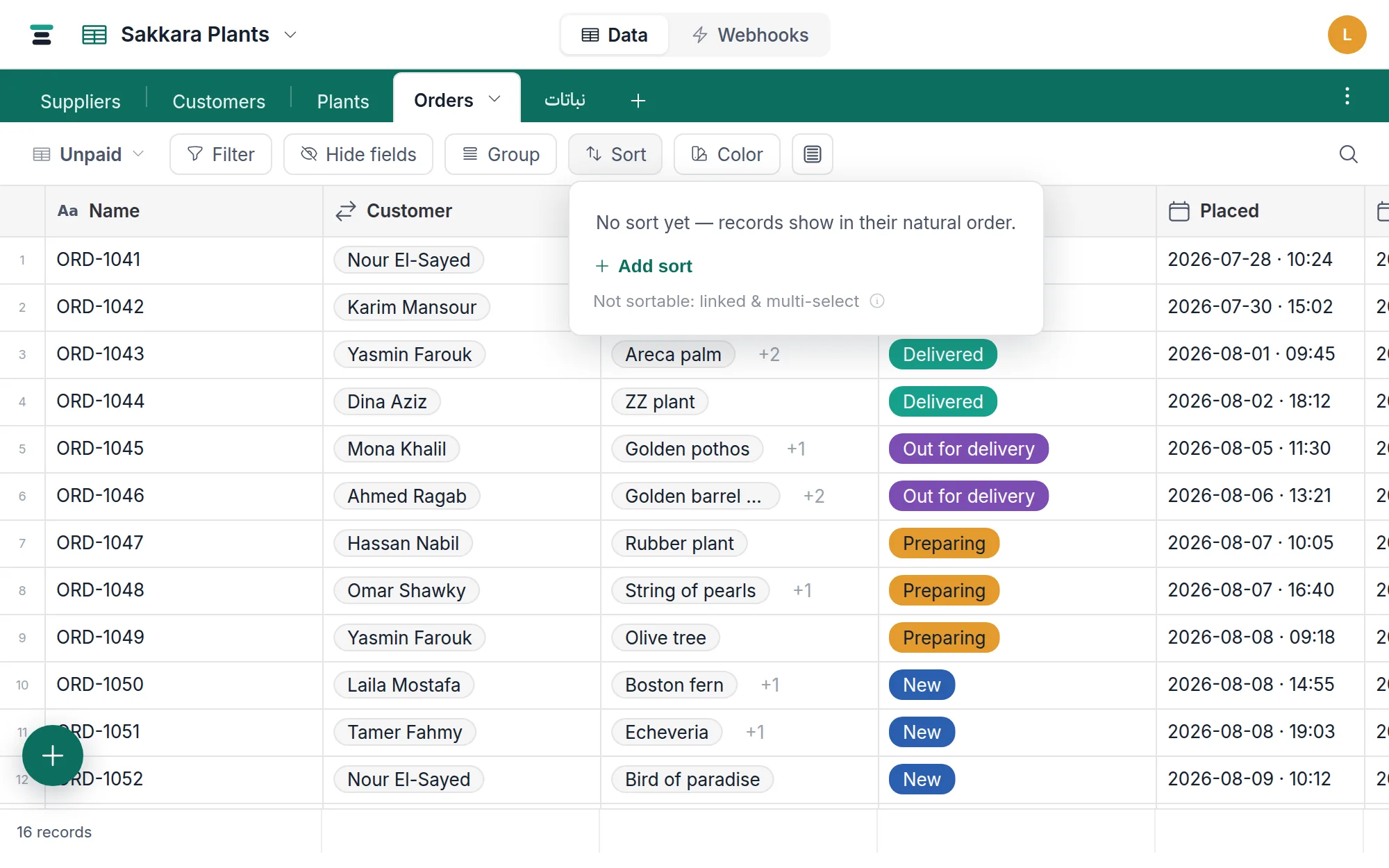
Set one
- Open Sort in the view bar.
- Pick a field. The direction button beside it toggles ascending and descending, and it says so in the field's own terms: A→Z on text, 1→9 on numbers and dates, No→Yes on a checkbox, and First→Last on a select — which sorts in choice order, not alphabetically. Hover it for the long version ("Earliest first", "Checked first").
- Add sort adds another level. Levels read as they act: sort by the first, then by the next — ties in level one are broken by level two, and so on.
With no sort at all, the panel says what you get: records show in their natural order — the order they were created in, which is also the stable order paging relies on.
Selects sort in choice order — deliberately
Sorting by a select field orders records by the
field's choice order, not alphabetically. New → Preparing → Out for delivery → Delivered → Cancelled is a pipeline; A→Z would turn it into
Cancelled, Delivered, New…, which means nothing. You defined the order once,
in the field; the sort respects it. To change the sort, reorder the choices.
Three more placement rules worth knowing:
- Empty cells sort last ascending, first descending — the records with no value never bury the ones with one.
- Ascending on a checkbox puts unchecked before checked.
- Text sorts the way a person alphabetises it. Capitals don't come first
(
Sweet and Sneezysorts beforeSweet Dream Schemes, not after every capital letter in the column), and an accented letter sits with its plain one —Émilenext toEmile, not banished past Z. This is ICU's language-neutral ordering, chosen so a database holding Arabic and English side by side isn't sorted by English's rules.
Which field types sort
Sortable: single line text, long text, email, phone, URL, member, number, currency, percent, rating, duration, date, checkbox, single select — and formula fields, as whatever they produce.
Not sortable: linked records, multi-select (and multi-member), attachments,
lookups, rollups, buttons. The first three can hold several values per cell,
so there is no single order to sort by — the panel says so in its own footnote.
Lookups and rollups are computed across a link rather than stored, so there is
no column for ORDER BY to read; the API refuses them plainly (Field "Items" (number) cannot be sorted on.). If you need to order by a rollup's number
today, the workaround is honest but real: it doesn't exist — sort by a stored
field instead.
Where the sort shows up
Everywhere the view does. The grid orders its rows by it; the gallery's cards follow it exactly; on the board, every column orders its cards by it. The calendar is the exception — chronology is its order, so it has no Sort button at all.
One button changes jobs: on a grouped grid, Sort becomes Sort groups and arranges the groups themselves; the order of records inside each group moves into the Group menu.
Over the API, the same sorts are the sort= parameter —
sort=fld_abc:desc,fld_def:asc — same fields, same rules; see
/docs/api.
The questions people ask
Does sorting rearrange the stored table? No. A sort is a lens the view holds; the table's resting order stays what it was — creation order — and every other view keeps its own sort. Remove the sort and nothing has moved.
Can I drag rows into a custom order? Not today. Order in Tabla is always
derived — from a sort, or from creation order. When a hand-made order matters,
give it a home in the data: a number field (1, 2, 3…) you sort by is an
order you can also edit, filter on and read over the API.
Why did my sorted view shuffle when someone edited a record? Because the sort is live. Change a record's Deliver by and it moves to where that date now belongs, in front of everyone with that view open — no reload. A record someone creates arrives in its right place the same way, rather than at the bottom.
The one row that holds still is the one you are editing: it stays put while you work, so a value you're half way through typing never slides out from under you. It takes its new place the next time the view loads.
How do I tell which column a view is sorted by? Its header carries a small arrow in your database's colour — pointing down for descending, up for ascending — with a number beside it when more than one field is sorted. The rows themselves are left alone: a coloured column already means a colour rule matched.