Color rules: paint the records that match a condition
Color every record that matches a condition — a solid marker and a light wash. Twelve colors, first match wins, saved per view, built the way a filter is.
Updated September 2026
A filter removes records; a color rule keeps them all and makes some
impossible to miss. Deliver by before today → pomegranate turns the overdue
rows red without hiding anything — the difference between "show me only the
problem" and "show me everything, problem first."
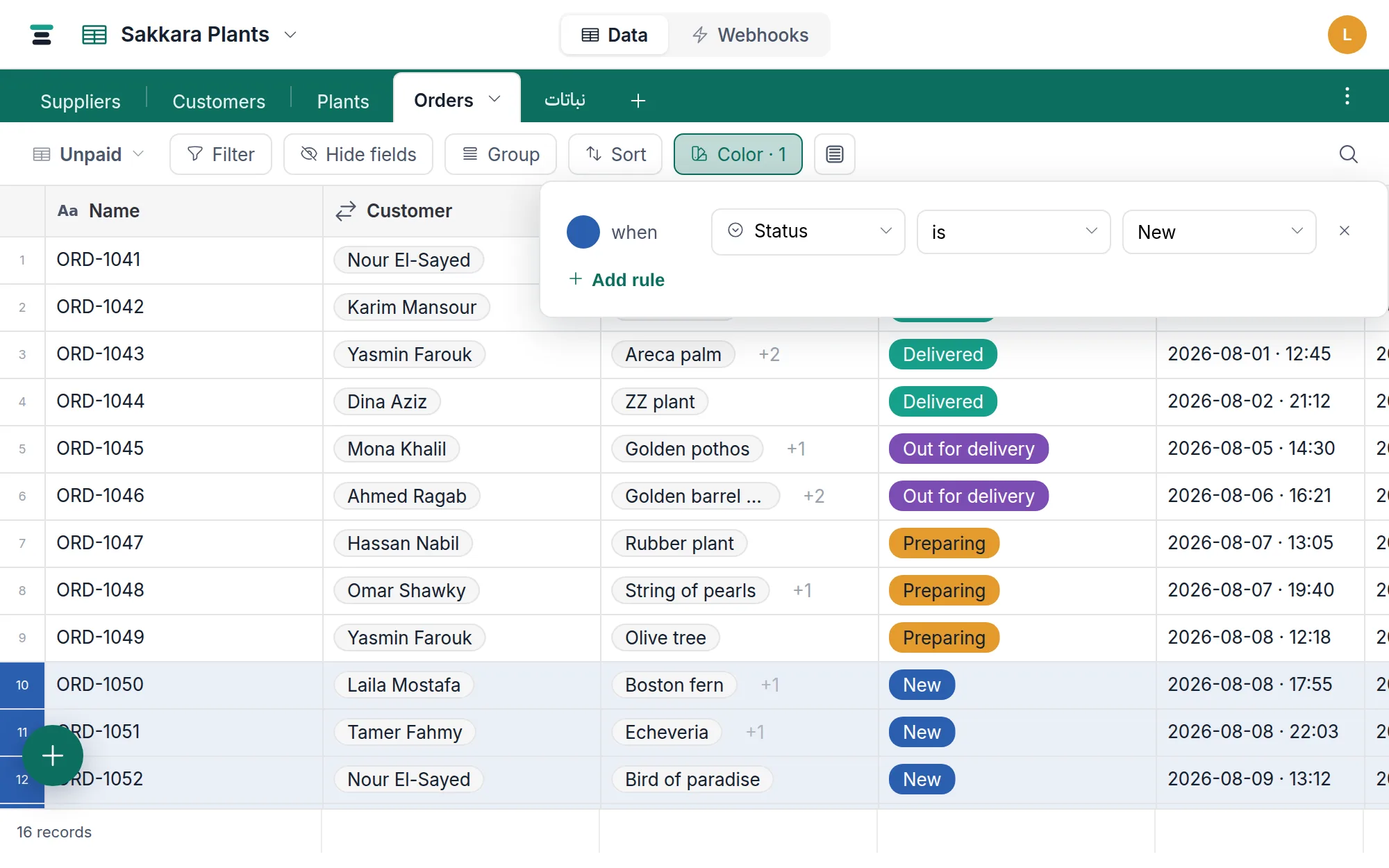
Make a rule
- Open Color in the view bar.
- Add rule. Each rule is a swatch plus a condition — color when
field · operator · value — the exact same row you'd build in the
filter, same operators per field type, same
value editors.
when Status is Cancelled,when Total is at least 1000,when Photo is empty. - Pick the swatch. Twelve colors: pomegranate, henna, saffron, ochre, olive, emerald, verdigris, nile, lapis, indigo, violet, rose.
Rules are checked top to bottom and the first match wins — a record is one color, never a blend. Put the rule that matters most first; the order in the panel is the order of precedence.
Like everything in the view bar, rules belong to the view: the button reads Color · 2 where two rules are set, and another view of the same table can paint by a different logic or not at all.
What the color looks like
In the grid, a matching record gets two marks: the row marker at the far left fills with the solid color, and the row itself takes a light wash of it — strong enough to scan, light enough that chips, text and checkboxes stay readable on top.
Elsewhere the same rule adapts to the surface: gallery and board cards wash the whole card; calendar entries are painted the picked color literally — and the calendar's swatch picker adds light and dark rows of each color, because there the shade you pick is exactly the shade you see. On a grouped grid the Color button also gains a Groups section — "when group is X" — for coloring whole sections rather than rows.
A public view link carries the rules with it: visitors see the wash too.
Small print worth knowing
- Renames don't break rules. A rule on a select stores the choice's id,
so renaming
NewtoIncomingleaves the rule pointing at the same choice. A rule whose choice is deleted stops matching — it never matches the wrong thing. - Rules on computed fields work. Conditions are evaluated against the
values the view is showing, so a rule on a rollup or lookup —
when Items is greater than 5— paints correctly as those values change. - A rule with an unfinished value matches nothing. Half-built rules are inert, not surprising.
- Coloring is not filtering. Every record still shows. When the question becomes "and hide the rest," move the same condition into the filter — the row you build is identical.
- The paint stays on screen. Exporting your database exports data — tables, fields, records, files. Views and their color rules aren't in the zip, because a wash on a row is presentation, not a value.
The questions people ask
How many rules can a view hold? There's no fixed cap — but since the first match wins, a long list mostly means later rules never fire. Two or three rules that each mean something beat ten that fight.
Can I color one cell, or a whole column? No — a rule colors records. For per-value color, that's what select choice colors already are: each choice carries its own color wherever it appears.