Group by: the grid folded into labeled sections
Fold a grid into collapsible sections by status, month, owner, a linked record or a rollup — still fully editable, with per-group counts and summaries.
Updated September 2026
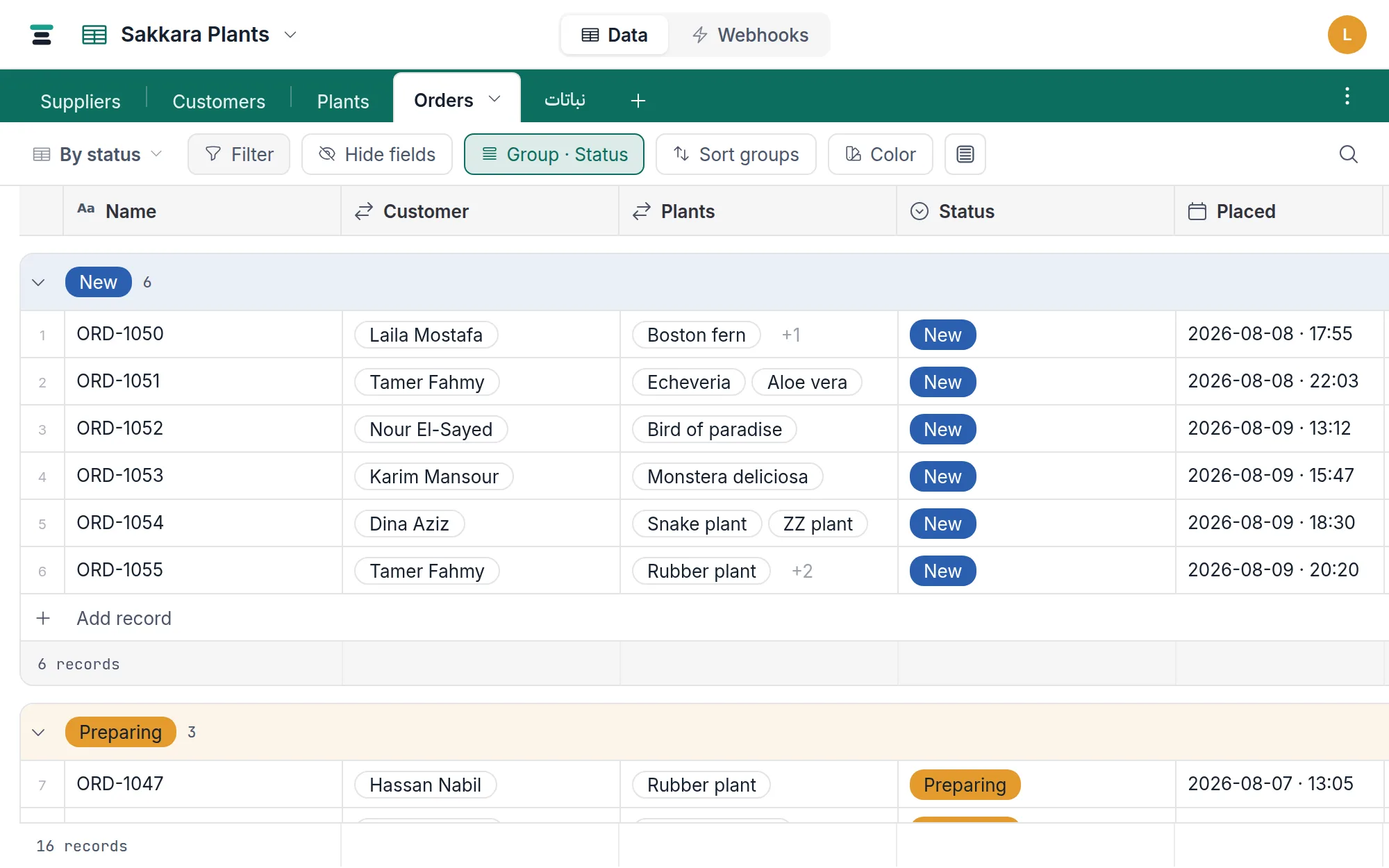
Grouping folds the grid into one section per value — orders by status, invoices by month, tasks by owner — without changing what anything is. Each section is still the grid: the same columns, inline editing, row numbers, right-click menus — long-press for those on touch, where a tap on a row opens it. What you gain is structure: a title bar per group, a count, a footer of per-group summaries, and a collapse chevron.
Set it up
- On a grid view, open Group in the view bar.
- Under Group by, choose a field. For a date field, a second control picks the bucket: Day, Week, Month, Quarter or Year — so "group by month" needs no helper field.
- Then by adds an optional subgroup — status within month, say.
Grouping is saved by the view, so a grouped By status and a flat Everything can coexist on one table. Remove grouping, at the bottom of the same menu, flattens it back.
Records whose group field is empty gather in an Empty group at the end — grouping never loses a record.
What can group
Nearly every field. Single line text, long text, email, phone, URL, member, number, currency, percent, rating, duration, date, checkbox, single select, multi-select, linked records, and the computed three — formulas, lookups and rollups — all group by what their cells hold.
Two don't: attachments and buttons. Grouping by a file or by a button has no answer anyone wants.
A cell holding several values makes one group, not several. An order
tagged Gift, Fragile files under "Gift, Fragile" — its own section,
separate from Gift alone and from Fragile alone. Records never appear
twice, so every group's count still adds up to the record count, and an
edit made in one group can't quietly move a row sitting in another. Order
inside the cell doesn't matter: Cairo, Giza and Giza, Cairo are the
same group. Where the values have ids underneath — linked records, select
choices — the group is keyed on those, so renaming a linked record relabels
its group instead of splitting it in two.
A single-select group wears its choice's own color on the title bar. A
group made of several values shows them as chips, in the cell's own order —
the first three, then a count of however many follow. The
Color button gains a Groups section here — "when group is New →
color" — for overriding any group's color, whatever the field type
(color rules proper keep working on rows too).
Collapsed groups
The chevron on a group's title bar collapses it to one line — which keeps its count and its footer summaries, so a collapsed month still shows its total. Collapse state is saved with the view: fold the done columns once and they stay folded for everyone, until someone opens them. Collapse all / Expand all live in the Group menu.
Each group's footer also carries + Add record, and a record added there is created with the group's value already filled in — add under "Preparing" and its status is Preparing; add under "Villa Mar" on a grouped link column and the new record is already linked to it. A computed group — formula, lookup or rollup — has nothing to write, so a row added there lands wherever its own values put it.
Two orders, two places
A grouped grid has two separate orders, and the view bar splits them deliberately:
- The order of the groups — the Sort button, relabeled Sort groups. Arrange by the group's own value (choice order for selects, chronological for dates, A→Z for text), by Record count, or by Summary value… — e.g. months by Sum of Total, descending. Selects can also force Alphabetical.
- The order of records inside each group — the Sort records rows inside the Group menu, which are the ordinary sort builder.
Summaries, per group and overall
Click any group footer cell to pick an aggregate — the same menu as the grid's own footer — and every group computes it over its own records, while the page bar at the bottom keeps the whole view's number. Sum of Total per status and overall, in one screen.
One honest mechanical note: to bucket and count exactly, the grouped view loads every record the filter matches (in the grid's 200-row pages, to the end) rather than paging on demand. On a very large table, filter first — a grouped view of a 100,000-record table with no filter is asking for all of it.
The questions people ask
Can I drag a record between groups? Not in the grid — dragging between values is the board's job. Here, edit the cell; the record re-files itself.
Why does the board stack by fewer fields than the grid groups by? Because a drop has to write something. Landing a card in a column means "this record's value is now that", which only reads one way for a single select or a member field. Grouping writes nothing, so it can afford the whole list.
Can I group by one of several linked records? Not separately — the cell groups as a set, so an order linked to three plants sits in one group named after all three. To read it plant by plant, work from the Plants table instead: each row there is one plant, and its mirror field lists the orders it appears in.