The checkbox field
On or off, one click: the eight icons and their colors, why filtering for unchecked also catches never-set cells, and the true/false API shape.
Updated September 2026
A checkbox is the smallest field there is: on, or off. Paid, confirmed, pet-safe — facts with two states and no discussion. In the demo plant shop, Paid on Orders and VIP on Customers are checkboxes.
Clicking the cell toggles it. That's the entire editing story — no editor opens, nothing to commit. In the record panel it's the same one-click toggle.
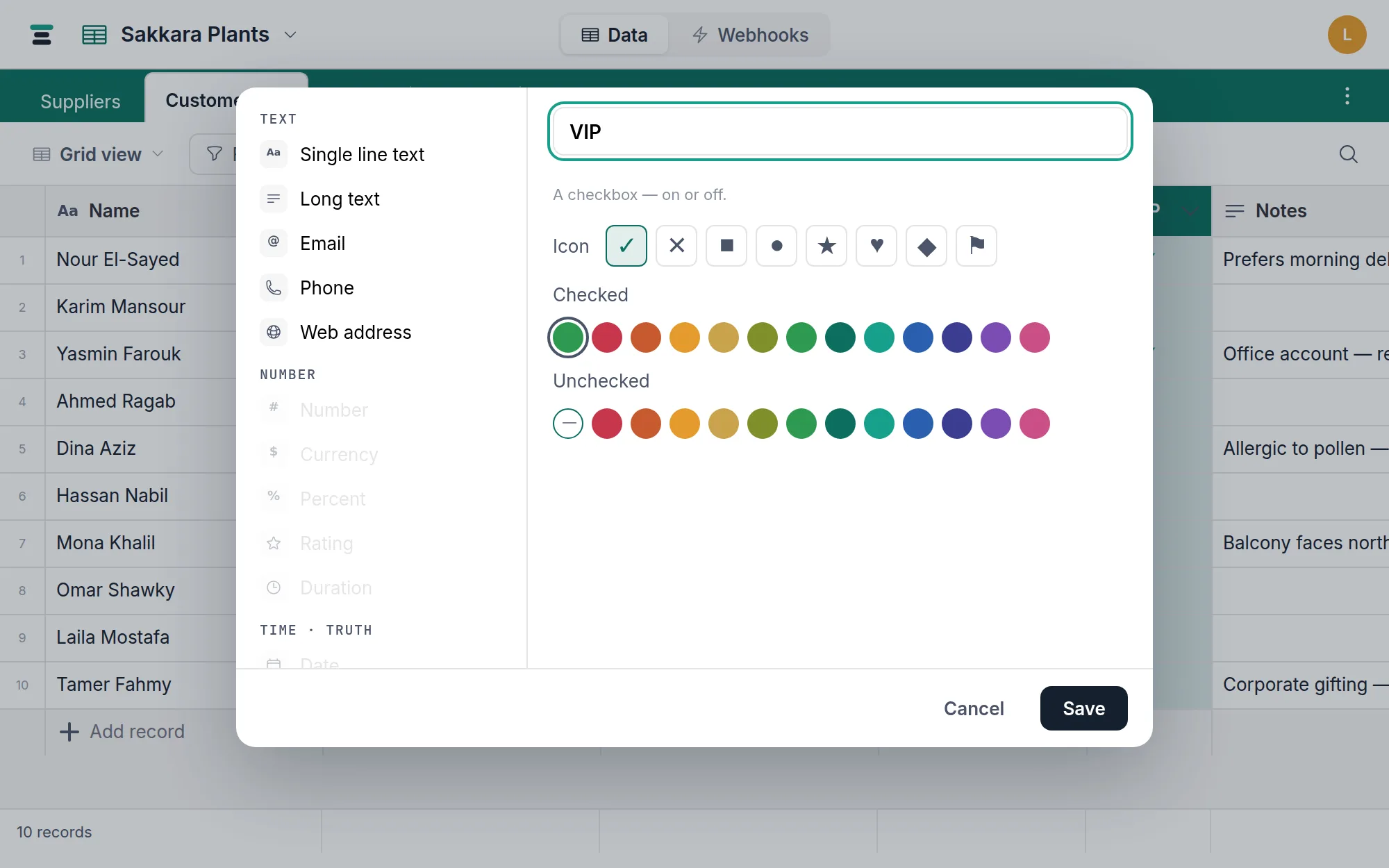
The options
- Icon — eight to pick from: check, cross, square, circle, star, heart, diamond, flag. Each has a filled checked form and an outline unchecked form.
- Checked — the color of the checked icon: a default green, or any of the twelve pigment colors.
- Unchecked — the unchecked icon's color: a quiet gray by default, or a pigment if off should be loud too.
A flag that turns red when checked is two clicks of configuration, and reads across a grid instantly.
Unchecked and never-set are the same answer
Underneath, a cell can hold true, false, or nothing at all — a record created over the API with the field omitted holds nothing, and draws exactly like unchecked. Tabla treats that honestly in the one place it could bite:
Filtering. A checkbox has a single operator, is, with two values: checked or unchecked. Unchecked matches both the explicitly-off cells and the never-set ones — so "everything not paid" means what a person means by it, and no record hides in a third state. There is deliberately no filter that tells false from empty.
Summaries follow suit: the footer offers Checked, Unchecked, and % filled counts.
Sorting, and where it can't go
Sorting ascending puts explicitly-unchecked cells first, checked after, and never-set cells at the very end — the one place false and empty part ways. A checkbox can't be the table's display field (a tick can't name a record) and can't require unique values — with two possible values, uniqueness would cap the table at two records.
Over the API
JSON booleans:
{ "fields": { "Paid": true } }
Reads return true, false, or null (never set). Writes accept only
true or false — "yes", 1, and friends are refused with
Field "Paid" expects true or false. Clear with null. Pasting in the
grid is looser (yes, 1, ✓ and their opposites parse), but the API
doesn't guess.
Filtering over the API uses the same single operator:
{"field": "Paid", "op": "is", "value": false} returns the unpaid — nine
records in the demo, false and never-set alike.
When it's the wrong field
The moment a two-state fact grows a third state, stop nesting checkboxes and reach for a select — "Draft / Sent / Paid" is one select, not two checkboxes with an impossible combination. If what you actually want to know is when it happened, store a date field ("Paid on") — empty means not yet, filled tells you more than a tick ever could. And if the flag should follow from other fields, that's a formula.